You've built a web application. Users are signing up. Traffic is growing. Then one day, everything slows to a crawl. Your database can't keep up. The server throws errors. Sound familiar?
Scalability isn't something you bolt on later—it's baked into your application from day one. Whether you're building a startup MVP or an enterprise platform, understanding how to scale saves you headaches down the road.
Let's break down the practical strategies that actually work.
What Does Scalability Really Mean?
Scalability is your application's ability to handle increased load without performance degradation. But there's more nuance here than most developers realize.
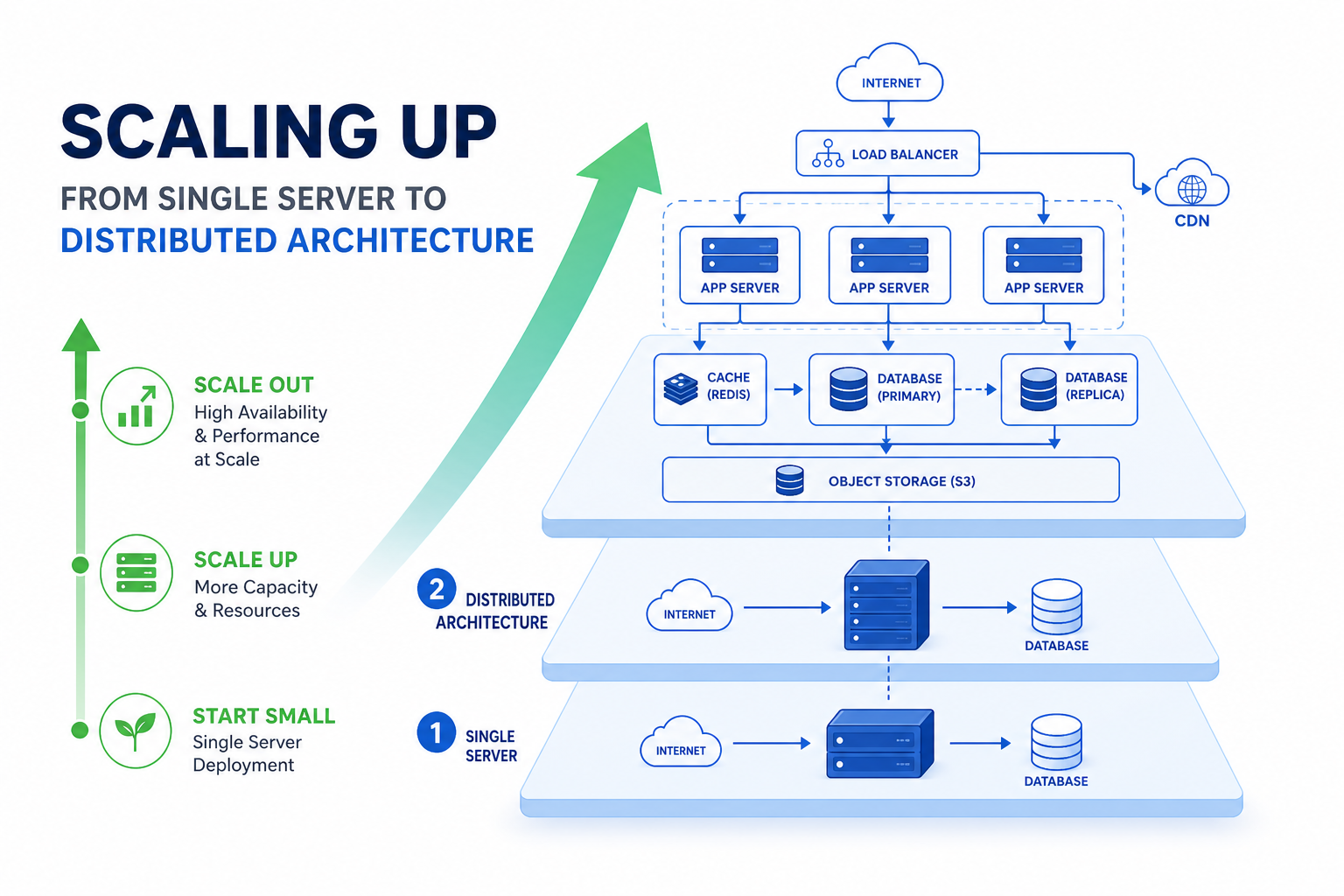
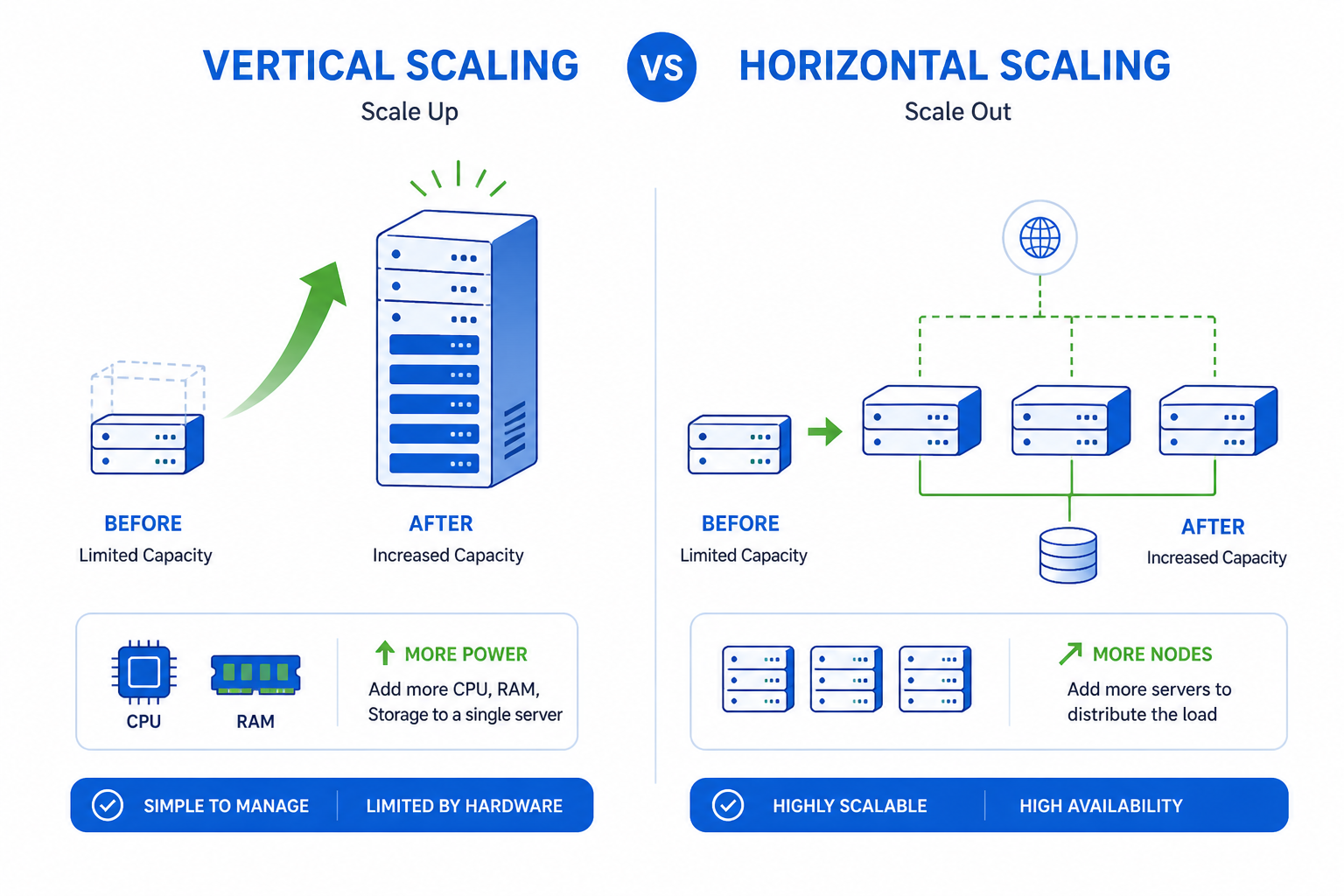
Vertical scaling means adding more power to existing machines—more RAM, faster CPUs, bigger SSDs. It's simple but hits a ceiling quickly.
Horizontal scaling means adding more machines to distribute the load. This approach has no theoretical limit, but requires thoughtful architecture.
The best systems use both. You vertically scale until it's cost-prohibitive, then horizontally scale from there.
Start with the Right Architecture
Your architecture decisions today determine your scaling options tomorrow. Here's what matters:
Stateless Application Design
Keep your application servers stateless. This means any server can handle any request without relying on local data from previous requests.
Store session data externally:
- Redis for session management
- JWT tokens for authentication
- External file storage for uploads
When servers are stateless, spinning up new instances becomes trivial. Load balancers can route traffic to any available server.
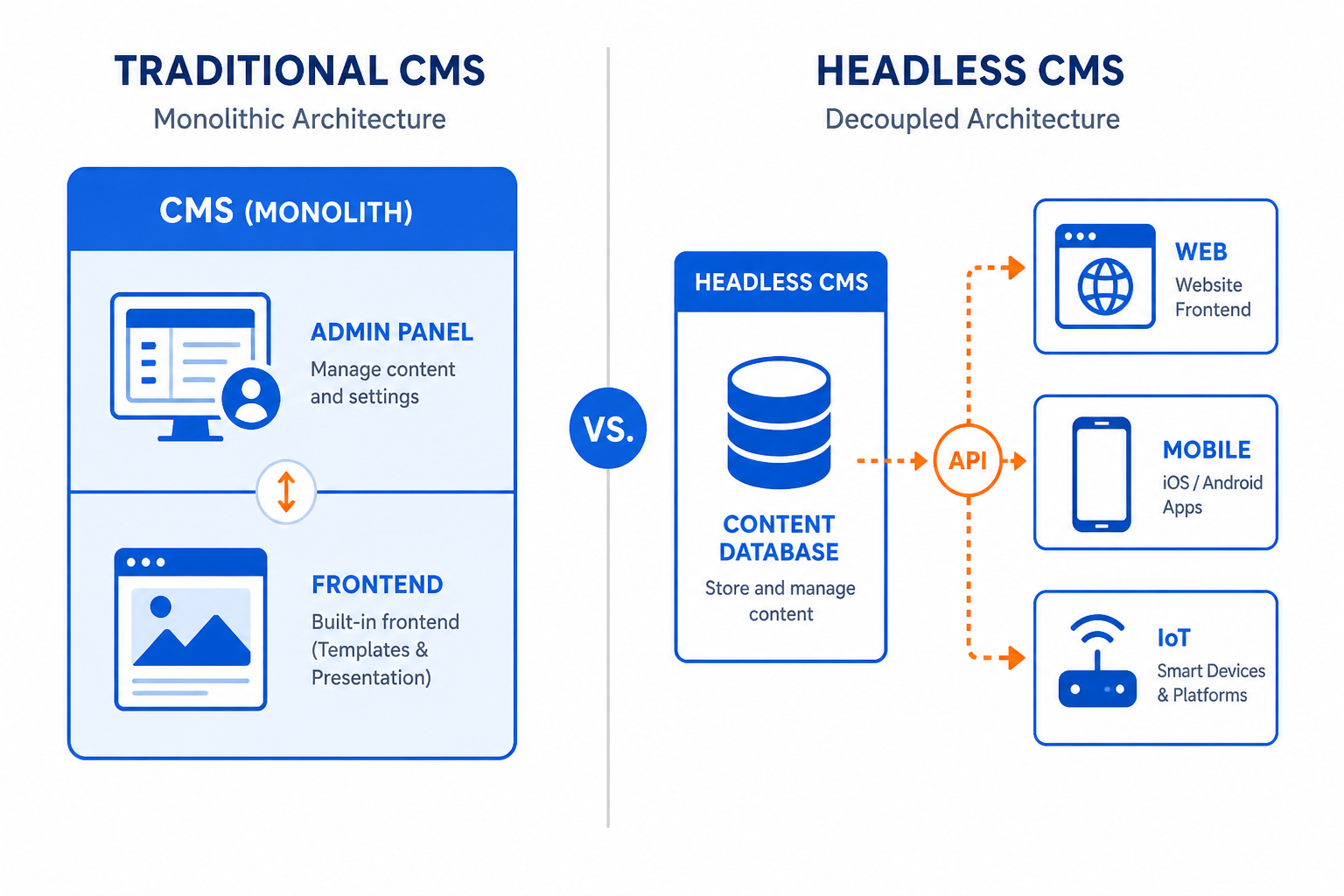
Microservices vs Monolith
The monolith vs microservices debate gets heated, but here's the practical truth: start with a well-structured monolith, then extract services as needed.
A monolith isn't bad. A poorly designed monolith is bad. If your code is modular internally, extracting pieces later is straightforward.
When to consider microservices:
- Different components need different scaling strategies
- Teams are large enough to own separate services
- Parts of your system have vastly different update frequencies
For most startups, a modular monolith handles early scaling needs just fine. Don't add complexity before you need it.
Database Optimization That Actually Scales
The database is usually the first bottleneck. Here's how to keep it healthy:
Index Strategically
Every query your application runs should use an index. Use your database's query analyzer to identify slow queries. Add composite indexes for common query patterns.
But don't over-index. Each index slows down writes. Find the balance based on your read/write ratio.
Read Replicas
Most applications read far more than they write. A common ratio is 90% reads, 10% writes.
Set up read replicas and route read queries to them. Your primary database handles writes while replicas handle reads. This alone can multiply your database capacity.
Write operations → Primary Database
Read operations → Read Replica 1, Replica 2, Replica 3
Connection Pooling
Database connections are expensive. Opening a new connection for every request wastes resources and hits connection limits quickly.
Use connection pooling. Tools like PgBouncer for PostgreSQL or ProxySQL for MySQL manage a pool of connections that your application reuses.
Consider Partitioning
When tables grow into hundreds of millions of rows, even indexed queries slow down. Table partitioning splits large tables into smaller, more manageable chunks.
Partition by:
- Date ranges (great for logs, analytics, time-series data)
- Geographic regions
- Customer/tenant ID
Caching: Your Performance Multiplier
Caching is the single most effective way to improve application performance. A cache hit is orders of magnitude faster than a database query.
Multi-Layer Caching Strategy
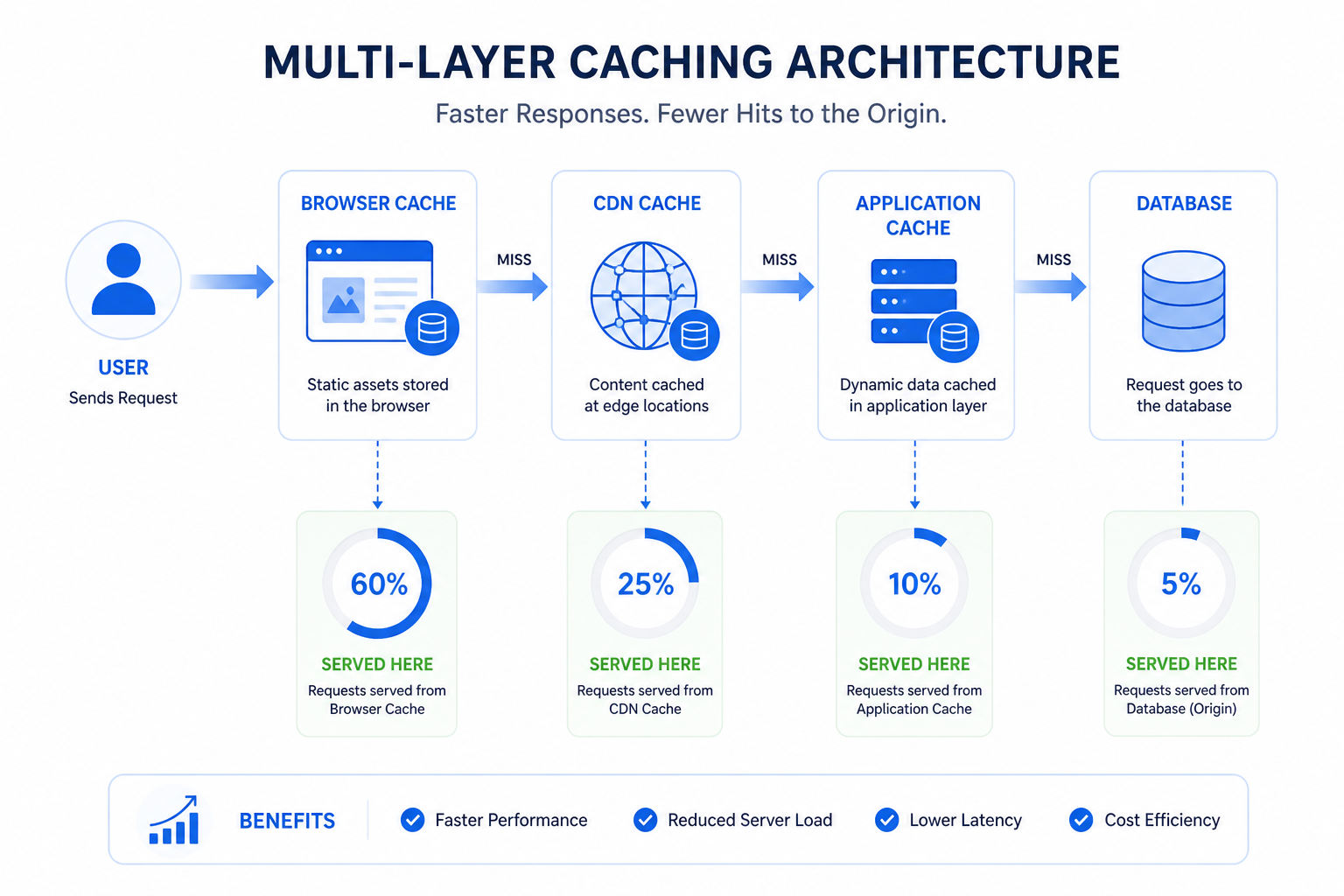
Build caching at multiple levels:
Browser cache: Set appropriate HTTP headers so browsers cache static assets.
CDN cache: Put CloudFlare, Fastly, or AWS CloudFront in front of your application. CDNs cache content at edge locations globally.
Application cache: Use Redis or Memcached to cache:
- Database query results
- Computed values
- Session data
- API responses
Database query cache: Most databases have built-in query caching. Enable and configure it properly.
Cache Invalidation
The hardest problem in caching is knowing when to invalidate. Stale cache data causes bugs that are notoriously hard to debug.
Strategies that work:
- Time-based expiration: Simple but may serve stale data
- Event-based invalidation: Invalidate when underlying data changes
- Cache-aside pattern: Application manages cache explicitly
For critical data, prefer shorter TTLs or event-based invalidation. For stable data like configuration, longer TTLs are fine.
Load Balancing and Traffic Distribution
When you have multiple application servers, you need something to distribute traffic between them.
Load Balancer Configuration
Use a load balancer (NGINX, HAProxy, or cloud-native options like AWS ALB) to:
- Distribute incoming requests across servers
- Health check servers and remove unhealthy ones
- Handle SSL termination
- Provide sticky sessions if absolutely necessary
Geographic Distribution
For global applications, deploy in multiple regions. Route users to the nearest data center using:
- DNS-based routing (Route 53, Cloudflare)
- Anycast networking
- CDN edge locations
This reduces latency dramatically. A user in Singapore shouldn't wait for a response from a server in Virginia.
Async Processing and Message Queues
Not everything needs to happen synchronously. In fact, trying to do too much in a single request is a common scaling mistake.
Move Work to Background Jobs
Identify operations that don't need immediate completion:
- Sending emails
- Processing uploads
- Generating reports
- Syncing with third-party services
- Analytics tracking
Push these to a message queue (RabbitMQ, AWS SQS, Redis queues) and process them asynchronously with worker processes.
Benefits:
- Faster response times for users
- Retry capability for failed operations
- Independent scaling of workers and web servers
Event-Driven Architecture
For complex systems, consider event-driven patterns. Services communicate through events rather than direct calls.
When a user signs up, you publish a "UserCreated" event. Separate services react to that event—one sends a welcome email, another sets up the user's workspace, a third updates analytics.
This decoupling makes each component independently scalable and replaceable.
Monitoring and Observability
You can't scale what you can't measure. Comprehensive monitoring isn't optional—it's essential.
Key Metrics to Track
Infrastructure metrics:
- CPU utilization
- Memory usage
- Disk I/O
- Network throughput
Application metrics:
- Request latency (p50, p95, p99)
- Error rates
- Throughput (requests per second)
- Apdex score
Business metrics:
- Active users
- Transaction volume
- Feature usage
Set Up Alerts
Don't wait for users to report problems. Set up alerts for:
- Error rate spikes
- Latency increases
- Resource exhaustion warnings
- Unusual traffic patterns
Tools like Datadog, New Relic, or open-source options like Prometheus + Grafana give you visibility into what's happening.
Auto-Scaling: Let the System Adjust
Manual scaling doesn't scale. Configure auto-scaling to add and remove resources based on demand.
Auto-Scaling Rules
Set up rules based on:
- CPU utilization thresholds
- Memory usage
- Queue length (for workers)
- Custom application metrics
Include both scale-up and scale-down rules. Scaling up is obvious, but scaling down saves money when traffic decreases.
Prepare for Traffic Spikes
If you expect traffic spikes (product launches, marketing campaigns, seasonal events), pre-scale before the event. Auto-scaling takes time—instances need to boot and warm up.
Cost Optimization
Scaling isn't just about handling more load—it's about doing it efficiently.
Right-Size Resources
Don't over-provision. Analyze actual usage and choose instance types that match your workload. A memory-optimized instance makes sense for caching servers, not for CPU-bound workers.
Reserved Capacity
For baseline load, use reserved instances or committed use discounts. Pay full price only for variable demand.
Spot Instances
For fault-tolerant workloads (background jobs, batch processing), spot instances offer 60-90% discounts. Your architecture just needs to handle interruptions gracefully.
Building for Scale: A Practical Checklist
Here's a checklist before you launch or as you grow:
✅ Application servers are stateless
✅ Sessions stored externally (Redis, JWT)
✅ Database queries are indexed and optimized
✅ Read replicas configured for high-read workloads
✅ Caching implemented at multiple layers
✅ Background job queue for async operations
✅ Load balancer distributing traffic
✅ Monitoring and alerting configured
✅ Auto-scaling rules defined
✅ Database connection pooling enabled
When to Call in the Experts
Building scalable systems is hard. Sometimes you need help from people who've done it before.
At Duo Dev, we help startups and businesses build web applications designed for growth. Whether you're architecting a new system or fixing scaling bottlenecks in an existing one, we've got the experience to help.
Wrapping Up
Scalability isn't magic—it's methodical. Start with solid architecture decisions. Optimize your database. Cache aggressively. Process asynchronously. Monitor everything.
Most importantly, don't over-engineer early. Build for your current scale with an eye toward the next order of magnitude. When you hit bottlenecks, you'll know where to focus.
Your application can handle ten times its current load. It just needs the right foundations.
Need help scaling your web application? Contact us for architecture consulting and development support.