Choosing a content management system used to be simple. Pick WordPress, install some plugins, and you're done. But the web has evolved, and so have the options.
Today, developers and businesses face a fundamental choice: traditional CMS or headless CMS. Both have legitimate use cases. Neither is universally better. Understanding the differences helps you pick the right tool for your project.
Let's cut through the marketing hype and examine what actually matters.
What Is a Traditional CMS?
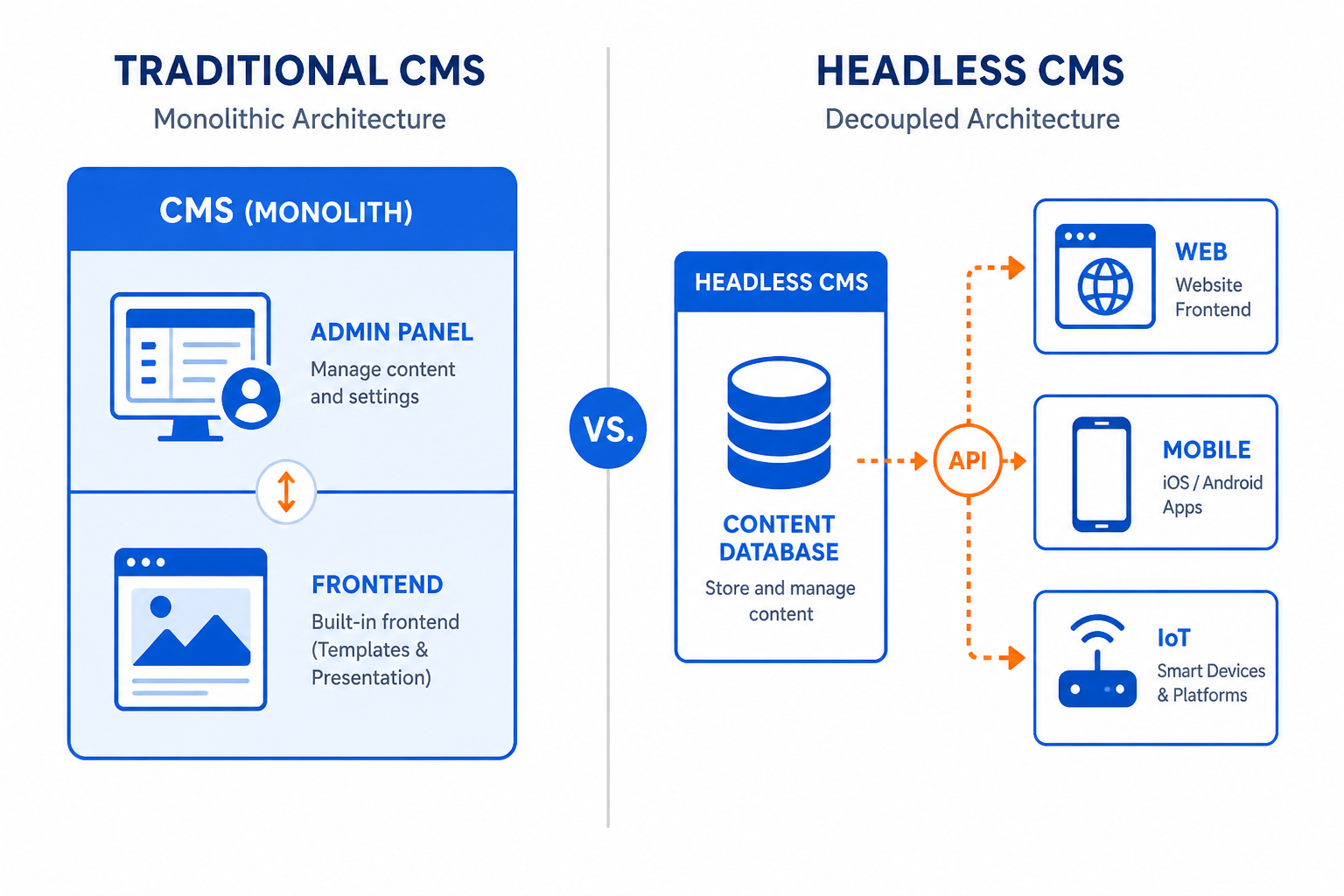
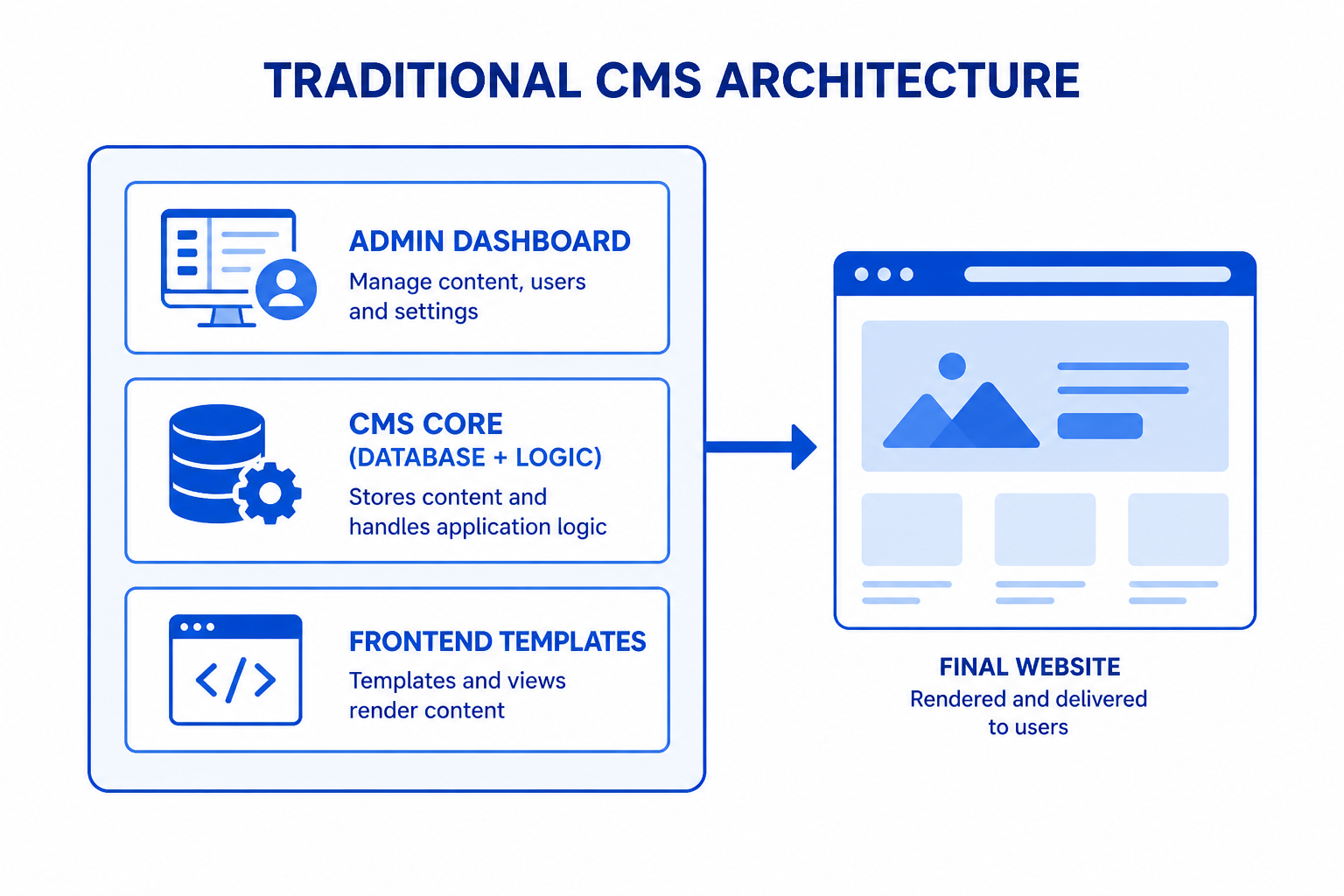
A traditional CMS is an all-in-one system that handles both content management and content presentation.
Examples: WordPress, Drupal, Joomla, Wix, Squarespace
When you use a traditional CMS:
- You edit content in an admin dashboard
- The CMS stores your content in its database
- The CMS generates the pages visitors see
- Frontend and backend are tightly coupled
Think of it as a complete package. You install it, pick a theme, add content, and have a working website. The CMS handles everything from the editing interface to the final HTML served to browsers.
This architecture is called "monolithic" because the frontend and backend are one inseparable unit.
What Is a Headless CMS?
A headless CMS separates content management from content presentation.
Examples: Contentful, Strapi, Sanity, Prismic, Directus, Ghost (headless mode)
When you use a headless CMS:
- You edit content in an admin dashboard (similar to traditional)
- The CMS stores your content and exposes it via API
- You build a separate frontend that consumes the API
- Frontend and backend are completely independent
The "head" in "headless" refers to the presentation layer—the frontend. A headless CMS removes that head, leaving only the body (content and API).
This means you're responsible for building the frontend yourself, typically using modern frameworks like React, Vue, Next.js, or Nuxt.
Key Differences Explained
Architecture
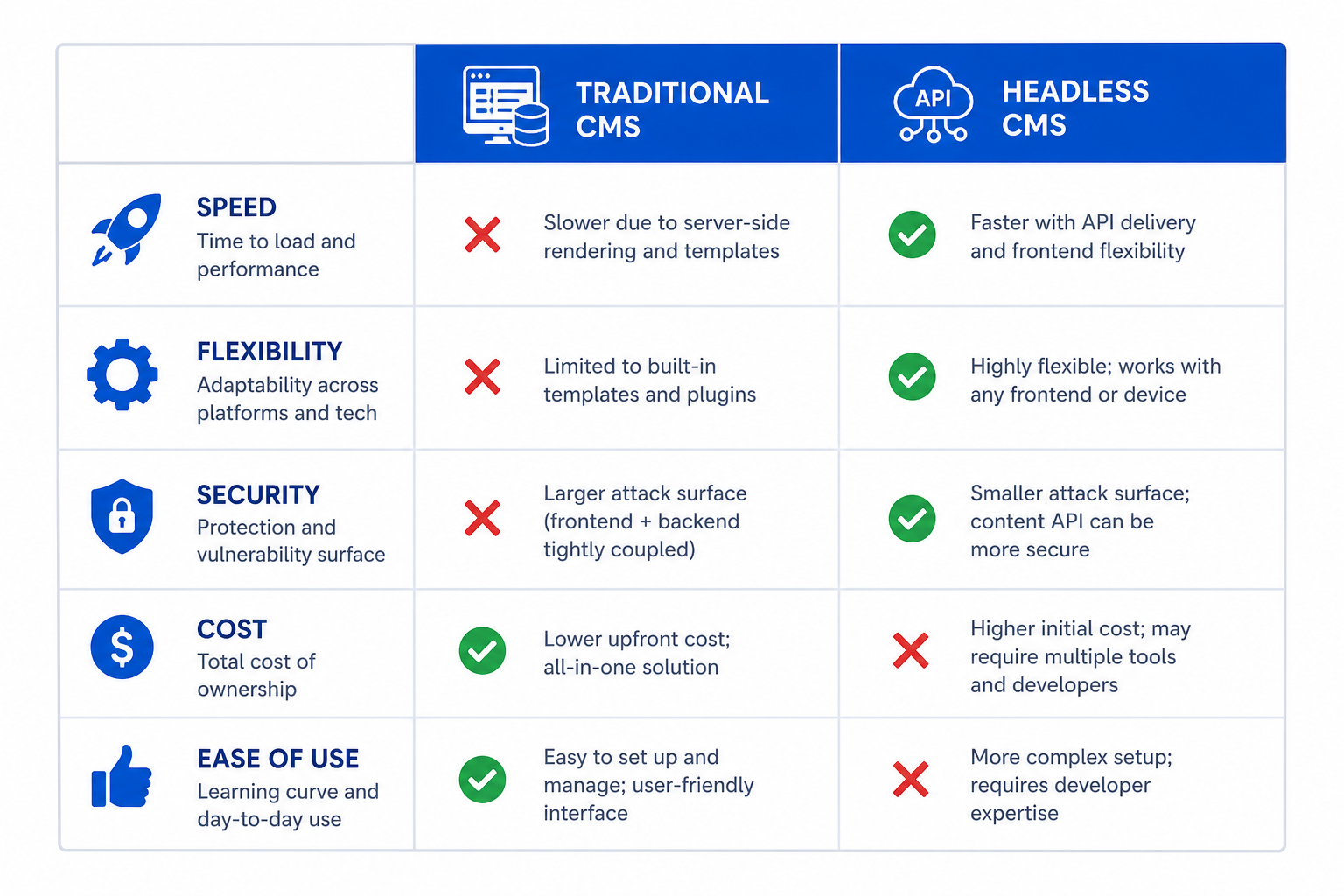
Traditional CMS: Monolithic. Frontend templates live inside the CMS. Changing the look requires working within the CMS's templating system.
Headless CMS: Decoupled. The CMS provides content via API. Your frontend can be built with any technology and deployed anywhere.
Flexibility
Traditional CMS: Limited to what themes and plugins support. Want something custom? You're often fighting the system.
Headless CMS: Build anything. Your frontend isn't constrained by the CMS. Use any framework, any design, any deployment model.
Development Complexity
Traditional CMS: Lower barrier to entry. Install, configure, launch. Non-developers can often build basic sites.
Headless CMS: Requires development expertise. You need to build the frontend yourself. This takes more time and technical skill.
Performance
Traditional CMS: Performance depends on the CMS, hosting, and plugins. Can be slow without optimization.
Headless CMS: The API-driven approach enables static site generation and edge caching. Typically faster when implemented well.
Security
Traditional CMS: Larger attack surface. The admin dashboard and frontend share the same server. Plugin vulnerabilities are common (especially in WordPress).
Headless CMS: Reduced attack surface. The CMS can be completely isolated from the public-facing site. Static frontends have minimal vulnerability.
Traditional CMS: Pros and Cons
Advantages
✅ Quick setup: Get a website running in hours, not weeks.
✅ Non-technical friendly: Business users can manage content without developers.
✅ Ecosystem: Thousands of themes and plugins available, especially for WordPress.
✅ All-in-one: Everything you need in one system. No integration headaches.
✅ Lower initial cost: Open-source options are free. Many affordable hosting options.
✅ WYSIWYG editing: See how content looks while editing it.
Disadvantages
❌ Limited flexibility: Constrained by the CMS's architecture and available plugins.
❌ Performance challenges: Can be slow without significant optimization.
❌ Security concerns: Popular platforms (WordPress) are frequent attack targets.
❌ Scaling difficulties: Handling traffic spikes requires more infrastructure work.
❌ Vendor lock-in: Migrating away from a traditional CMS is often painful.
❌ Single channel: Built primarily for websites, not multi-channel delivery.
Headless CMS: Pros and Cons
Advantages
✅ Complete flexibility: Build any frontend with any technology.
✅ Omnichannel ready: Same content serves web, mobile apps, IoT devices, digital signage.
✅ Superior performance: Static site generation and CDN deployment enable lightning-fast sites.
✅ Better security: Decoupled architecture reduces attack vectors.
✅ Future-proof: Switch frontends without touching content infrastructure.
✅ Scalability: APIs scale easily. Static sites handle massive traffic.
✅ Developer experience: Modern workflows with Git, CI/CD, and contemporary tools.
Disadvantages
❌ Requires development: You must build the frontend yourself.
❌ Higher complexity: More moving parts to manage and maintain.
❌ No preview by default: WYSIWYG editing requires custom implementation.
❌ Higher initial cost: Development time adds up. Some platforms charge per API call.
❌ Learning curve: Teams need to understand API-driven architecture.
❌ Over-engineering risk: Sometimes simple problems get complex solutions.
When to Choose Traditional CMS
Traditional CMS shines in these scenarios:
Simple Websites
Brochure sites, portfolios, and blogs don't need complex architecture. A traditional CMS gets them online quickly and affordably.
Non-Technical Teams
If the people managing content aren't developers, traditional CMS interfaces are more intuitive. WYSIWYG editing requires zero technical knowledge.
Limited Budget
Building a headless frontend costs money. If budget is tight, WordPress with a good theme delivers value.
Rapid Launch
Need a site up in days? Traditional CMS templates accelerate launch. Headless requires building from scratch.
Content-Heavy Sites
News sites, magazines, and blogs benefit from traditional CMS workflows optimized for publishing.
When to Choose Headless CMS
Headless CMS makes sense for:
Multi-Platform Content
If you need the same content on your website, mobile app, smart TV app, and digital kiosk, headless is the answer. One content source, multiple frontends.
Custom Experiences
When design requirements exceed what templates offer, headless removes constraints. Build exactly what you envision.
High-Performance Requirements
E-commerce sites, SaaS applications, and high-traffic platforms benefit from static generation and edge caching.
Large-Scale Applications
Enterprise applications with complex frontend requirements need the flexibility headless provides.
Developer Teams
If you have skilled frontend developers, headless leverages their expertise. They can use modern frameworks and best practices.
Long-Term Projects
For applications with a multi-year lifespan, headless provides flexibility to evolve the frontend without touching content infrastructure.
Popular Options in Each Category
Traditional CMS
| CMS | Best For | Pricing |
|---|---|---|
| WordPress | Blogs, small business | Free (open source) |
| Drupal | Enterprise, complex sites | Free (open source) |
| Wix | Beginners, quick sites | $17-$159/month |
| Squarespace | Creative portfolios | $16-$52/month |
| Shopify | E-commerce | $29-$299/month |
Headless CMS
| CMS | Best For | Pricing |
|---|---|---|
| Contentful | Enterprise, scalability | Free tier, then $489+/month |
| Strapi | Self-hosted flexibility | Free (open source) |
| Sanity | Real-time collaboration | Free tier, then pay-as-you-go |
| Prismic | Marketing teams | Free tier, then $100+/month |
| Ghost | Publishing, memberships | $9+/month or self-hosted |
Hybrid Approaches
The line between traditional and headless has blurred. Many platforms now support both models.
WordPress as Headless CMS
WordPress exposes content via REST API. You can use WordPress for content management while building a separate React or Next.js frontend. Best of both worlds for teams comfortable with WordPress.
Decoupled Drupal
Drupal's JSON API module enables headless operation while keeping Drupal's powerful content modeling.
Traditional CMS with Static Export
Some traditional CMS platforms can export static HTML, gaining headless performance benefits without full API integration.
Making the Decision
Ask these questions:
1. Who manages content?
- Technical team → Either works
- Non-technical marketers → Traditional CMS likely easier
2. How many channels?
- Website only → Traditional works fine
- Multi-platform → Headless is designed for this
3. What's your timeline?
- Need it yesterday → Traditional is faster to launch
- Building for the long term → Consider headless benefits
4. What's your budget?
- Limited → Traditional CMS with existing themes
- Investment available → Headless enables superior results
5. Do you have developers?
- No development team → Traditional CMS
- Skilled developers → Headless leverages their abilities
6. How important is performance?
- Standard needs → Either works
- Speed-critical → Headless enables better optimization
The Reality of Modern Web Development
Here's what I've learned building websites for years:
Most small businesses should start with a traditional CMS. It's faster, cheaper, and they don't need the complexity. A well-built WordPress site serves most needs.
Growing businesses with development resources should consider headless. The flexibility pays dividends as requirements evolve.
Enterprises with multi-channel needs almost always benefit from headless architecture. The upfront investment enables scalability.
There's no universal answer. The best CMS is the one that fits your specific situation, team, budget, and goals.
Making It Work
Whichever approach you choose, implementation quality matters more than architecture choice. A well-built traditional CMS site outperforms a poorly implemented headless setup.
Focus on:
- Clear content structure
- Performance optimization
- Security best practices
- User experience
- Maintainability
The technology matters less than how well you use it.
Need help choosing or implementing a CMS? Contact Duo Dev for expert guidance on content management architecture.