Full stack developer. The title sounds impressive—and a bit intimidating. Someone who can build entire applications from front to back? That seems like a lot to learn.
It is a lot. But it's also achievable with the right approach.
If you're wondering where to start, what to learn, and how to piece it all together, this guide is for you. No prior experience required—just curiosity and willingness to learn.
What Is Full Stack Development?
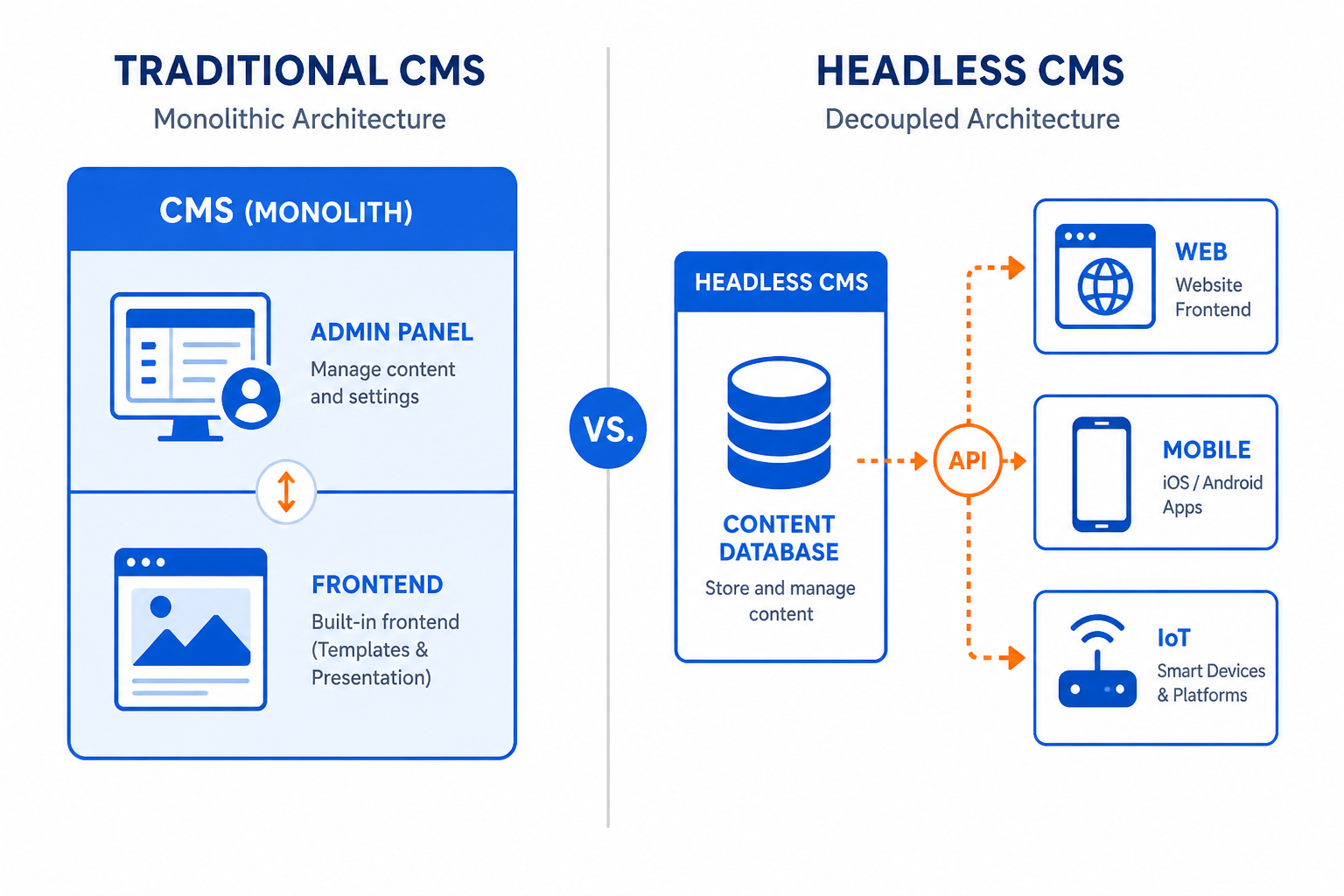
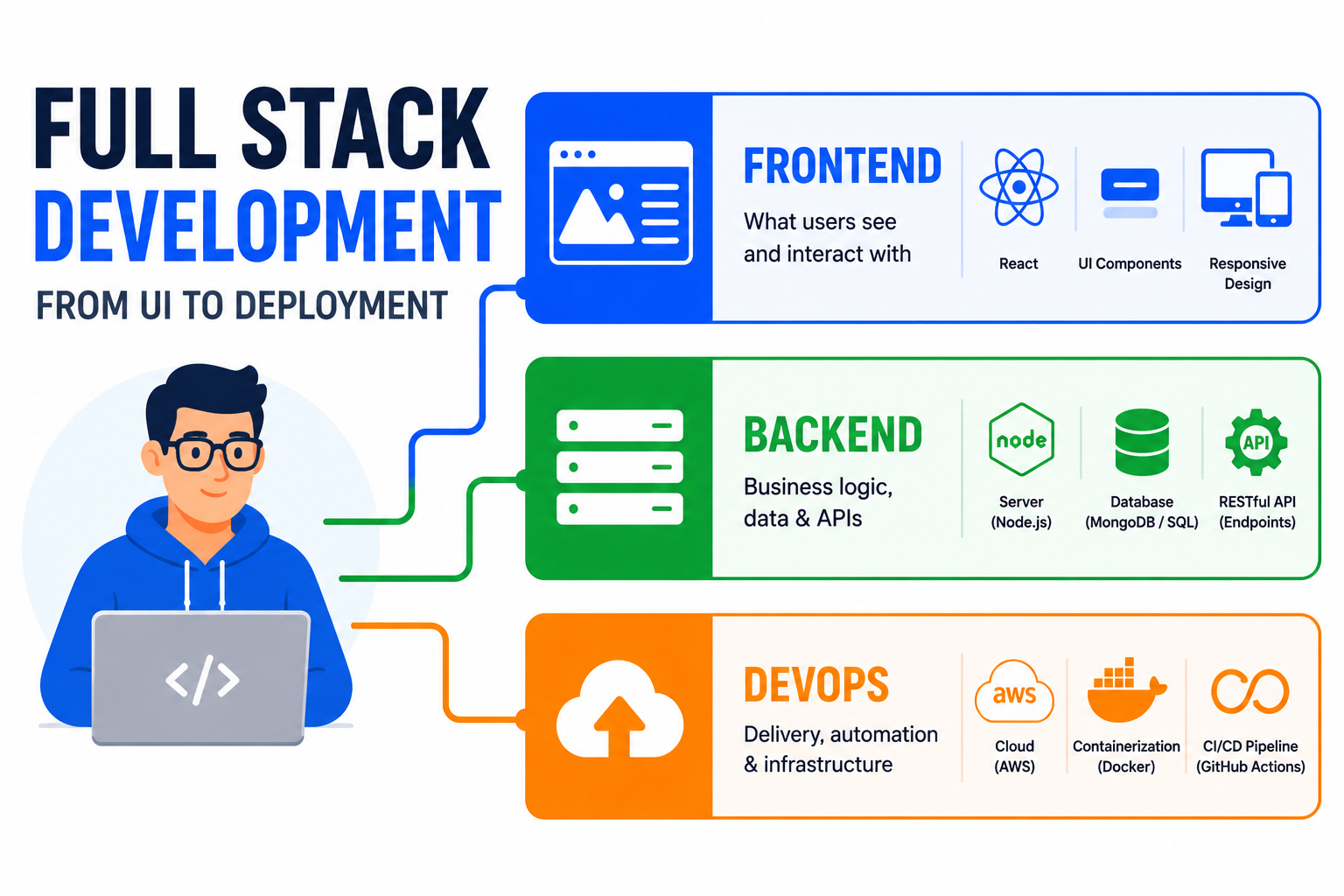
A full stack developer works on both frontend (what users see) and backend (what happens behind the scenes).
Frontend: The visual interface. Buttons, forms, layouts, animations. Everything users interact with in their browser.
Backend: The server logic. User authentication, data storage, API endpoints. The invisible machinery that makes applications work.
Full Stack: Both. The ability to build complete, functioning applications independently.
You don't need to master everything—nobody does. But you need enough understanding to work across the entire stack and make informed decisions.
The Technology Landscape
Let's break down what full stack development involves:
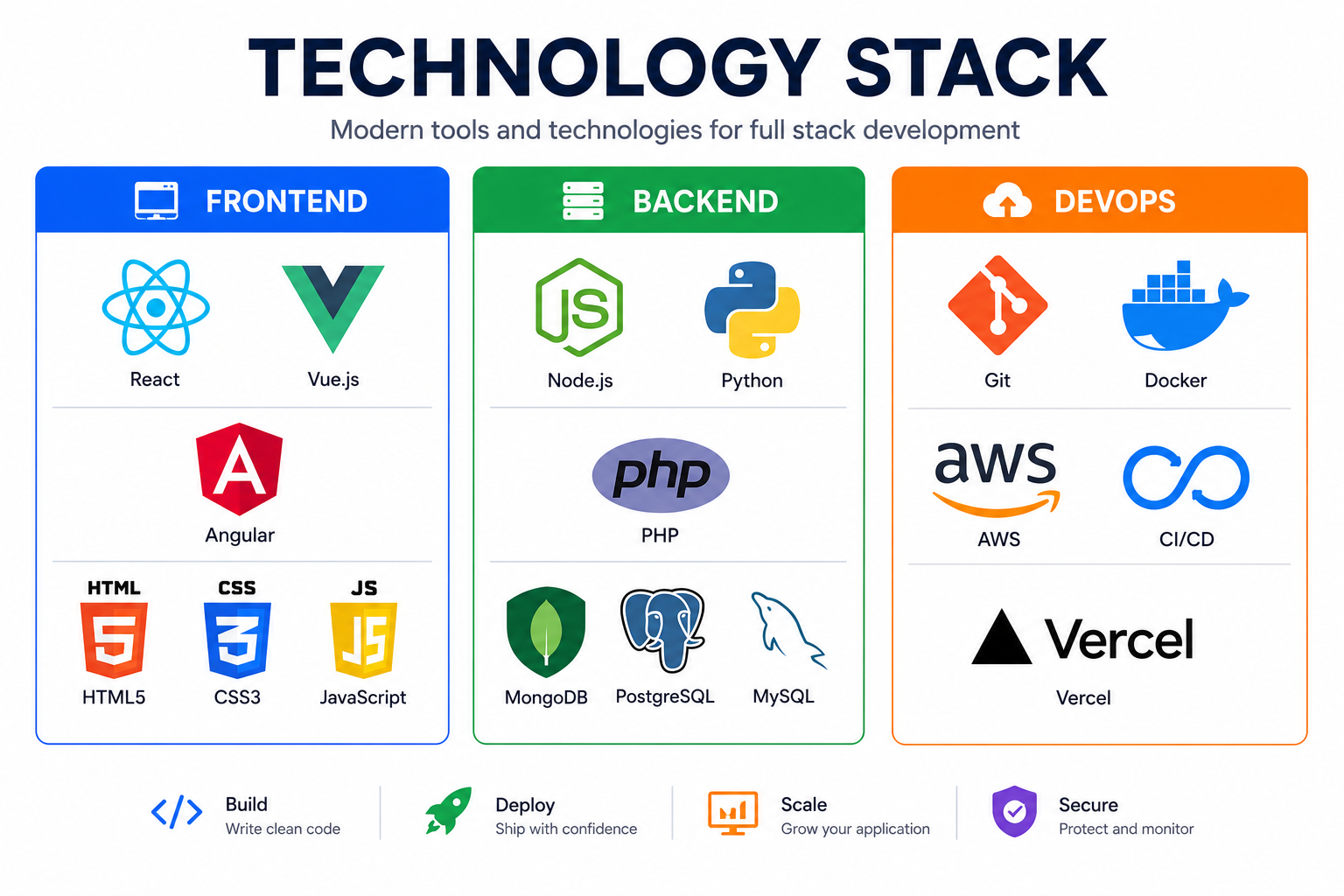
Frontend Technologies
Core fundamentals:
- HTML (structure)
- CSS (styling)
- JavaScript (interactivity)
Modern frameworks:
- React (most popular)
- Vue (approachable)
- Angular (enterprise-focused)
Styling approaches:
- CSS frameworks (Tailwind, Bootstrap)
- CSS preprocessors (Sass)
- CSS-in-JS (styled-components)
Backend Technologies
Languages:
- JavaScript (Node.js)
- Python (Django, Flask)
- PHP (Laravel)
- Java (Spring Boot)
- Go
- Ruby (Rails)
Databases:
- SQL: PostgreSQL, MySQL
- NoSQL: MongoDB, Redis
APIs:
- REST APIs
- GraphQL
DevOps/Infrastructure
Version control: Git, GitHub
Deployment: AWS, Google Cloud, Digital Ocean, Vercel
Containers: Docker
CI/CD: GitHub Actions, Jenkins
Choosing Your Stack
You can't learn everything. Pick a stack and go deep.
Popular Full Stack Combinations
MERN Stack:
- MongoDB (database)
- Express.js (backend framework)
- React (frontend)
- Node.js (runtime)
Best for: JavaScript lovers. One language for everything.
MEVN Stack:
- MongoDB
- Express.js
- Vue.js
- Node.js
Best for: Simpler learning curve than React.
LAMP Stack:
- Linux (operating system)
- Apache (web server)
- MySQL (database)
- PHP (backend)
Best for: Traditional web applications.
Python + React:
- Django or Flask (backend)
- PostgreSQL (database)
- React (frontend)
Best for: Data-heavy applications.
Laravel + Vue:
- Laravel (PHP backend)
- Vue.js (frontend)
- MySQL (database)
Best for: Rapid development, great developer experience.
My Recommendation for Beginners
Start with JavaScript throughout:
- JavaScript/HTML/CSS for frontend basics
- React for modern frontend
- Node.js + Express for backend
- MongoDB or PostgreSQL for database
- Git for version control
One language (JavaScript) reduces cognitive load. You can explore other languages later.
Learning Path: Step by Step
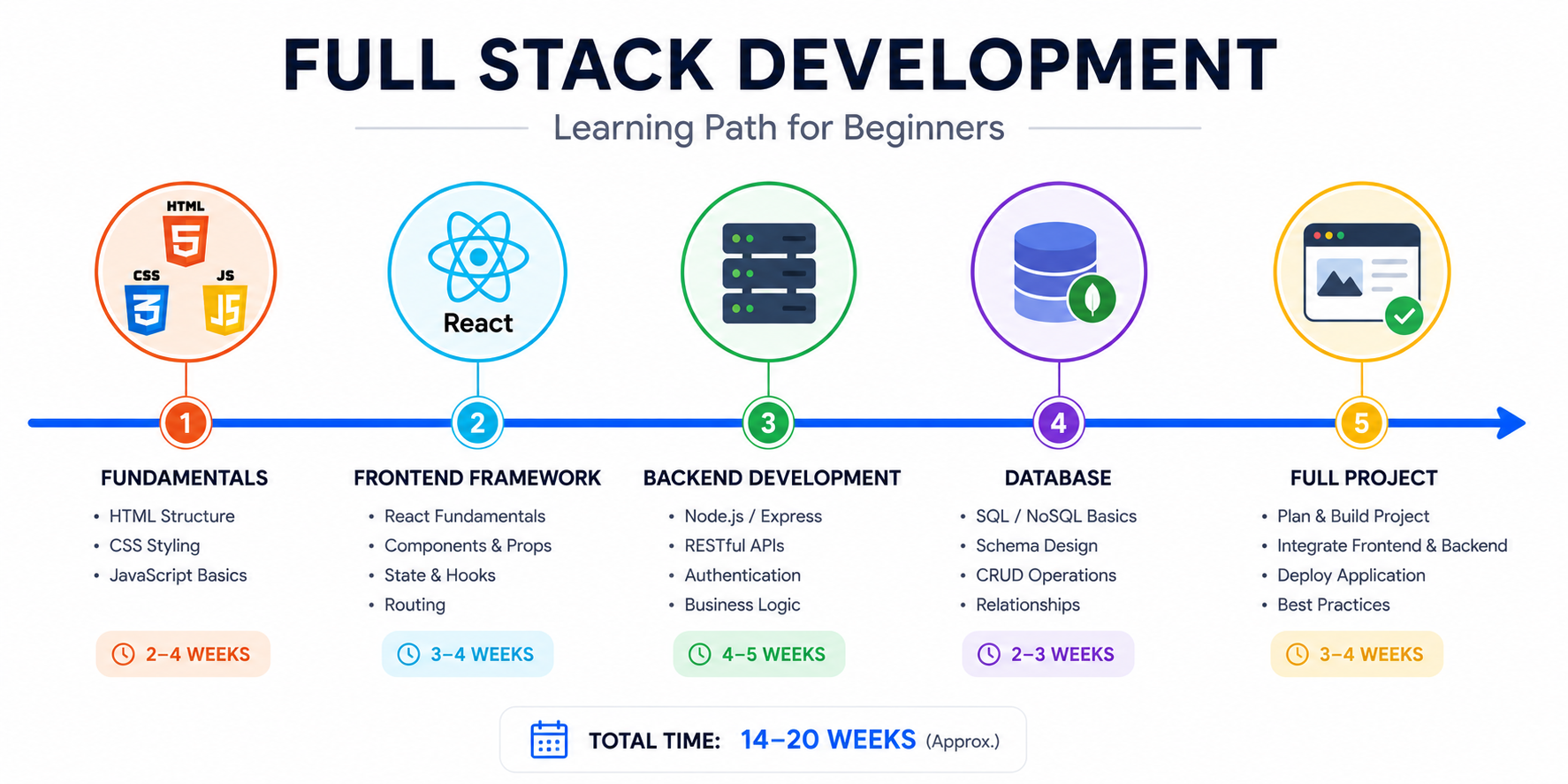
Phase 1: Web Fundamentals (4-8 weeks)
Before frameworks, understand the basics.
Learn:
- HTML structure and semantics
- CSS styling, layouts (Flexbox, Grid)
- JavaScript fundamentals (variables, functions, DOM manipulation)
Build:
- Static website (personal portfolio)
- Interactive elements (forms, dropdowns)
- Simple JavaScript game (tic-tac-toe)
Resources:
- MDN Web Docs (free, excellent reference)
- freeCodeCamp (free, project-based)
- The Odin Project (free, comprehensive)
Don't rush this phase. Fundamentals matter.
Phase 2: Frontend Framework (4-6 weeks)
Pick one framework. React is most marketable.
Learn:
- Component-based architecture
- State management
- Props and data flow
- Hooks (useState, useEffect)
- Routing
Build:
- Todo application
- Weather app (using public APIs)
- E-commerce product page
Phase 3: Backend Basics (6-8 weeks)
Now make your frontend talk to a server.
Learn:
- How HTTP works (requests, responses, status codes)
- Node.js basics
- Express.js routing
- RESTful API design
- Middleware concepts
Build:
- Simple REST API (CRUD operations)
- API for your frontend projects
- Authentication system
Phase 4: Database (3-4 weeks)
Data needs somewhere to live.
Learn:
- SQL basics (queries, joins, relationships)
- Database design principles
- ORM usage (Mongoose for MongoDB, Sequelize for SQL)
Build:
- Connect your API to a database
- User management system
- Blog with posts, comments, authors
Phase 5: Full Application (4-8 weeks)
Put it all together.
Build a complete project:
- Frontend + Backend + Database
- User authentication
- CRUD operations
- Deployment to production
Project ideas:
- Task management app
- Expense tracker
- Social media clone (simple version)
- E-commerce store
This is where learning solidifies.
Phase 6: DevOps Basics (2-4 weeks)
Get your projects live.
Learn:
- Git workflow (branches, commits, pull requests)
- Hosting options (Vercel, Netlify, Railway)
- Environment variables
- Basic deployment
Do:
- Deploy your full stack project
- Set up continuous deployment
- Configure a custom domain
Phase 7: Continuous Learning
Full stack development keeps evolving.
Ongoing:
- Follow technology updates
- Explore new tools and frameworks
- Contribute to open source
- Build increasingly complex projects
Practical Learning Tips
Build Projects, Not Just Tutorials
Tutorials feel productive. You follow along, things work. But you're not learning to solve problems—you're learning to copy.
Tutorial trap: Watch → Copy → "Understand" → Forget
Better approach: Learn concept → Build something without tutorial → Get stuck → Research → Solve
Struggling is learning. Embrace it.
Start Small, Then Expand
Don't build Netflix on day one.
Week 1: Static HTML page
Week 4: Interactive JavaScript
Week 8: Simple React app
Week 12: Full stack application
Each project should be slightly beyond your current ability. Not overwhelming, but challenging.
Read Error Messages
Beginners often panic at errors. Errors are helpful—they tell you exactly what's wrong.
Read the error message. Google it. Understand it. Errors are learning opportunities.
Version Control Everything
Use Git from day one. Even for small projects.
git init
git add .
git commit -m "Initial commit"
This habit will serve you throughout your career.
Learn to Debug
Print statements are fine. Browser DevTools are better.
Learn:
- Console.log strategically
- Browser debugging tools
- Network tab for API calls
- React DevTools
Debugging skill grows with experience. Practice intentionally.
Common Mistakes to Avoid
Trying to Learn Everything at Once
The technology landscape is overwhelming. Don't try to learn React, Vue, Angular, Node, Python, and Docker simultaneously.
Pick a path. Go deep. Branch out later.
Skipping Fundamentals
Jumping straight to React without understanding JavaScript fundamentals leads to confusion.
Can you explain:
- How functions work?
- What closure means?
- How async/await works?
- What "this" refers to?
If not, revisit fundamentals.
Never Finishing Projects
Starting is exciting. Finishing is hard.
The graveyard of half-finished projects teaches little. Completing projects—even simple ones—builds confidence and demonstrates capability.
Not Building a Portfolio
Your skills need proof. Build a portfolio showing:
- Real projects (not tutorial clones)
- Code on GitHub
- Live deployments
- Problem-solving ability
This matters for job hunting.
Comparing Yourself to Others
Someone on Twitter shipped a full SaaS in a weekend. Someone else learned React in two weeks.
Don't compare. Everyone's journey differs. Focus on consistent progress, not speed.
Resources for Learning
Free Resources
- freeCodeCamp: Full curriculum, certifications
- The Odin Project: Project-based, comprehensive
- MDN Web Docs: Reference documentation
- JavaScript.info: Deep JavaScript knowledge
- YouTube: Traversy Media, Fireship, Web Dev Simplified
Paid Courses
- Udemy: Affordable, project-based courses
- Frontend Masters: Professional depth
- Egghead.io: Concise, advanced topics
- Scrimba: Interactive coding
Books
- Eloquent JavaScript by Marijn Haverbeke (free online)
- You Don't Know JS series by Kyle Simpson (free on GitHub)
Building Your Career
Portfolio Projects
Build projects that demonstrate real-world capability:
- Personal portfolio site (required)
- Full CRUD application with authentication
- API integration project (consume external APIs)
- Group project (collaboration skills)
Contributing to Open Source
Contributions show:
- You can read others' code
- You can work in existing codebases
- You understand git workflows
- You can communicate about code
Start small. Fix documentation. Add tests. Gradually tackle bigger issues.
Networking
- Attend local meetups
- Join online communities (Discord, Reddit)
- Share your learning on Twitter/LinkedIn
- Help others who are earlier in their journey
Relationships often lead to opportunities.
What's Next?
Full stack is a foundation, not an endpoint. Once comfortable, explore:
- Mobile development (React Native)
- DevOps and infrastructure
- Testing and quality assurance
- Performance optimization
- Security practices
The learning never stops. That's what makes development exciting.
Ready to build your first full stack project? Contact Duo Dev if you need guidance or want to discuss a project idea.