
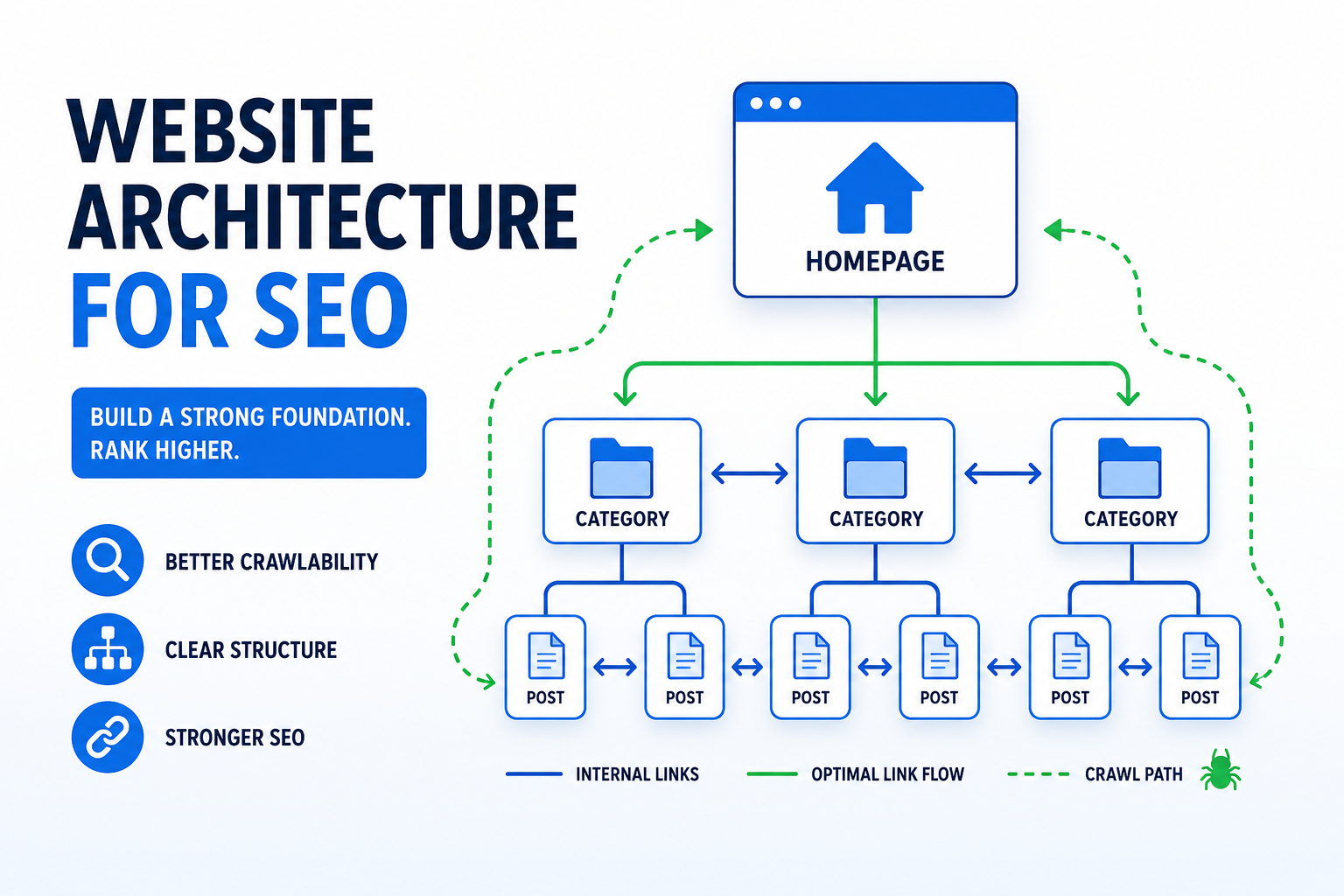
Before you write a single line of code or create your first page, there's a crucial step most people skip: planning your website architecture.
Website architecture is how your pages are organized and connected. Get it right, and search engines understand your content. Get it wrong, and even great content struggles to rank.
This isn't just technical SEO—it's the foundation everything else builds on.
What Is Website Architecture?
Website architecture refers to:
- How pages are organized into categories and hierarchies
- How URLs are structured
- How pages link to each other
- How users navigate through content
Think of it like a library. Books aren't thrown in randomly—they're organized by section, then subject, then alphabetically. Visitors can find what they need, and the organization makes sense.
Your website should work the same way.
Why Architecture Matters for SEO
Crawlability
Search engine bots follow links to discover pages. If important pages are buried deep or poorly linked, bots may never find them—or find them less frequently.
Well-architected sites ensure:
- Every page is reachable within 3-4 clicks from the homepage
- Important pages have many internal links
- Crawl budget isn't wasted on low-value pages
Authority Distribution
Internal links pass authority (link equity) between pages. Your architecture determines how this authority flows.
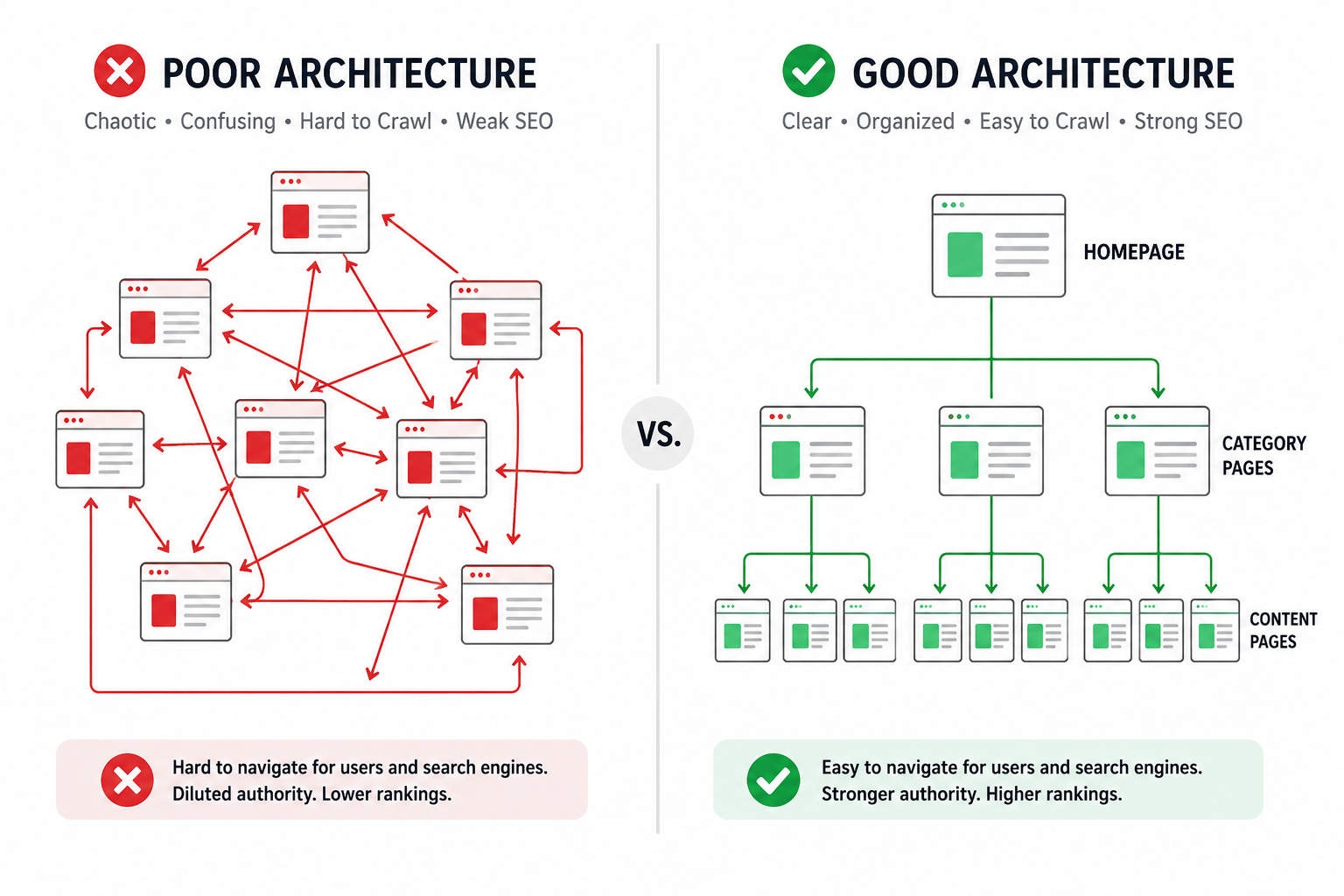
Poor architecture: Homepage authority stays on homepage
Good architecture: Authority flows to important pages throughout the site
User Experience
Search engines increasingly consider user experience signals. If users can't find what they need, they bounce—hurting your rankings.
Clear navigation, logical organization, and intuitive paths help users and search engines alike.
Planning Your Site Structure
Start with Categories
Before individual pages, think about your content categories. What are the main topics your site covers?
Example for an e-commerce site:
- Men's Clothing
- Shirts
- Pants
- Accessories
- Women's Clothing
- Dresses
- Tops
- Accessories
- Shoes
- Men's Shoes
- Women's Shoes
Example for a service business:
- Services
- Web Development
- Mobile Apps
- Consulting
- Industries
- Healthcare
- Finance
- Retail
- Resources
- Blog
- Case Studies
- Documentation
The Pyramid Structure
The most SEO-friendly architecture follows a pyramid shape:
Level 1 (Top): Homepage
- Highest authority page
- Links to all major category pages
Level 2: Category Pages
- Broad topic hubs
- Link to homepage and subcategories
- Target competitive keywords
Level 3: Subcategory Pages
- More specific groupings
- Link to parent categories and individual pages
- Target medium-competition keywords
Level 4 (Bottom): Individual Content Pages
- Blog posts, product pages, etc.
- Link to parent categories and related content
- Target specific, long-tail keywords
The Three-Click Rule
Users should reach any page within three clicks from the homepage. More clicks = less likely to be found.
Calculate your click depth:
- Homepage
- Category page
- Subcategory or content page
If you need five clicks to reach content, restructure.
URL Structure Best Practices
Your URLs should reflect your architecture and be readable by both humans and search engines.
Hierarchy in URLs
Good URLs mirror site structure:
Homepage:    example.com/
Category:    example.com/web-development/
Subcategory: example.com/web-development/frontend/
Content:     example.com/web-development/frontend/react-best-practices/
Each segment adds specificity. Users know where they are. Search engines understand relationships.
URL Guidelines
Do:
- Use lowercase letters
- Separate words with hyphens
- Include relevant keywords
- Keep URLs reasonably short
- Make URLs readable
Don't:
- Use underscores or spaces
- Include unnecessary parameters
- Use session IDs in URLs
- Create excessively long URLs
- Use cryptic identifiers
Bad:
example.com/page?id=4532&ref=nav&sort=date
example.com/p/4532
Good:
example.com/blog/seo-website-architecture-guide
Handling URL Changes
When restructuring existing sites:
- Implement 301 redirects from old URLs to new
- Update internal links to new URLs
- Update sitemaps
- Monitor Search Console for crawl errors
Never change URLs without redirect plans.
Internal Linking Strategy
Internal links are the glue of website architecture. They guide users and distribute authority.
Contextual Links
Links within content are most valuable:
- Use descriptive anchor text
- Appear where relevant
- Help users find related content
- Pass contextual relevance signals
Navigation Links
Primary navigation should include:
- Main category pages
- Key service/product pages
- Important conversion pages (Contact, Pricing)
Keep navigation consistent across pages.
Footer Links
Footer can include:
- Secondary navigation
- Legal pages (Privacy, Terms)
- Contact information
- Social links
Don't stuff footers with excessive links—it dilutes value.
Hub Pages (Pillar Content)
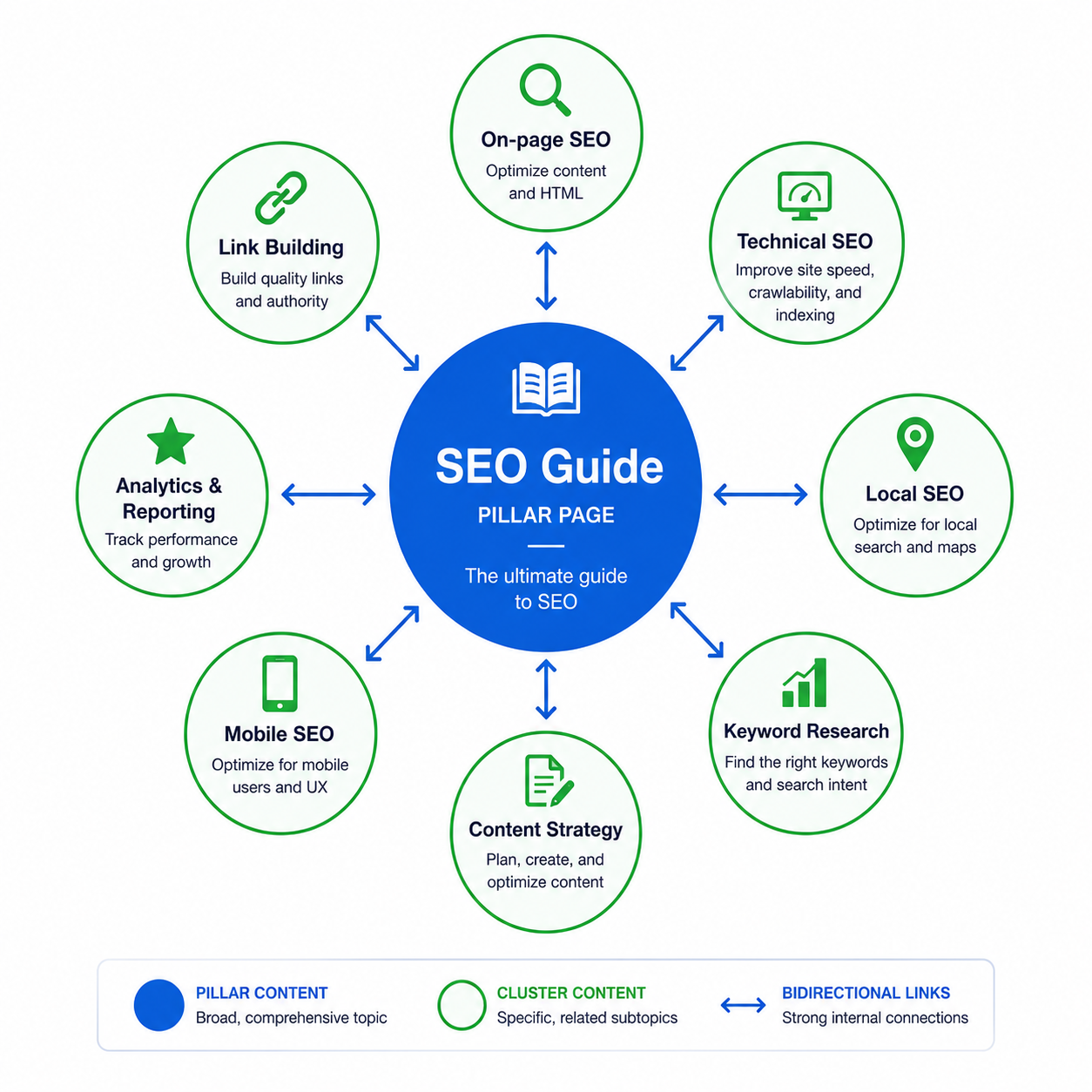
Create comprehensive hub pages that link to all related content:
Example Hub: "Complete Guide to SEO"
- Links to: On-page SEO, Off-page SEO, Technical SEO, Local SEO
- Each linked page links back to the hub
- Creates topical cluster signaling expertise
This pillar-cluster model helps establish topical authority.
Navigation Best Practices
Main Navigation
- Limit to 7 items maximum
- Use clear, descriptive labels
- Make clickable area large enough
- Ensure mobile responsiveness
- Highlight current section
Good labels:
- Services, Products, Blog, About, Contact
Bad labels:
- Solutions, Resources (too vague)
Breadcrumbs
Breadcrumbs show users (and search engines) where they are:
Home > Blog > SEO > Website Architecture Guide
Benefits:
- Improves navigation
- Reduces bounce rates
- Creates internal links
- Enables breadcrumb rich snippets
Implement breadcrumb schema markup for rich results.
HTML Sitemaps
While XML sitemaps are for search engines, HTML sitemaps help users find content:
- List all major pages by category
- Link from footer
- Update when adding pages
Especially useful for large sites.
Planning for Growth
Good architecture scales. Plan for where your site will be in 2-3 years, not just today.
Scalable Category Structure
Create categories that can expand:
Too specific:
- Blue Nike Running Shoes for Men
Scalable:
- Men's Shoes > Running Shoes > Nike
As inventory grows, the structure accommodates.
Avoiding Dead Ends
Every page should have paths forward:
- Related content links
- Category navigation
- Next/previous (for sequential content)
- Popular posts sidebar
Don't let users hit dead ends.
Consistent Patterns
Use consistent URL patterns across content types:
Blog:     /blog/[post-slug]
Products: /products/[category]/[product-slug]
Services: /services/[service-slug]
Consistency helps both users and search engines predict where content lives.
Technical Implementation
XML Sitemaps
Your sitemap should reflect your architecture:
<url>
  <loc>https://example.com/</loc>
  <priority>1.0</priority>
</url>
<url>
  <loc>https://example.com/services/</loc>
  <priority>0.8</priority>
</url>
<url>
  <loc>https://example.com/services/web-development/</loc>
  <priority>0.7</priority>
</url>
Priority values reflect hierarchy importance.
Generate sitemaps with ToolByte Sitemap Generator.
Canonical Tags
Prevent duplicate content issues:
<link rel="canonical" href="https://example.com/blog/seo-guide/" />
Every page should have a canonical tag, even self-referencing.
Schema Markup
Use structured data to communicate hierarchy:
BreadcrumbList schema:
{
  "@context": "https://schema.org",
  "@type": "BreadcrumbList",
  "itemListElement": [
    {
      "@type": "ListItem",
      "position": 1,
      "name": "Home",
      "item": "https://example.com"
    },
    {
      "@type": "ListItem",
      "position": 2,
      "name": "Blog",
      "item": "https://example.com/blog"
    }
  ]
}
Common Architecture Mistakes
Orphan Pages
Pages with no internal links pointing to them. Search engines may not find them.
Fix: Audit for orphan pages. Add internal links or remove unneeded pages.
Overcomplicated Navigation
Too many navigation options overwhelm users.
Fix: Simplify to essential items. Use dropdowns sparingly.
Inconsistent Structure
Different URL patterns for similar content confuse users and search engines.
Fix: Establish patterns and follow them consistently.
Ignoring Mobile Navigation
Desktop navigation doesn't translate directly to mobile.
Fix: Design mobile navigation specifically. Consider hamburger menus, bottom navigation, or simplified options.
Too Flat or Too Deep
Too flat: Everything linked from homepage, no hierarchy
Too deep: Content buried 6+ clicks deep
Fix: Aim for balanced pyramid structure, 3-4 levels maximum.
Architecture Planning Checklist
Before building or restructuring:
- Define all content categories
- Plan URL structure patterns
- Sketch site hierarchy
- Identify hub/pillar pages
- Plan navigation structure
- Define internal linking strategy
- Plan for future content
- Document naming conventions
Wrapping Up
Website architecture isn't exciting, but it's foundational. A well-planned structure makes everything else—content, SEO, user experience—work better.
Take time to plan before building. Restructure existing sites gradually if needed. The investment pays dividends for years.
For more on technical SEO implementation, see our On-page SEO Checklist (2026).
Need help planning or restructuring your website architecture? Contact Duo Dev for website architecture consulting and development.