
SEO involves a lot of repetitive work. Checking rankings. Auditing pages. Analyzing competitors. Generating reports.
Most of this can be automated.
Scripts handle the grunt work so you can focus on strategy. What takes hours manually takes minutes with automation. What's error-prone manually becomes consistent with scripts.
Let's explore practical ways to automate your SEO workflow.
Why Automate SEO Tasks?
Save Time
Manual SEO tasks eat hours:
- Checking 500 keyword rankings
- Auditing 1,000 pages for issues
- Generating weekly reports
- Monitoring competitor changes
Scripts do this in minutes while you do other things.
Improve Consistency
Manual work introduces errors:
- Missed pages
- Inconsistent analysis
- Human fatigue
- Copy-paste mistakes
Scripts run the same way every time.
Scale Operations
What works for 50 pages doesn't work for 50,000.
Automation scales linearly. Double the pages? Same script runs slightly longer.
Enable Real-Time Monitoring
Automated scripts can run continuously:
- Alert when rankings drop
- Notify of site errors
- Track competitor changes
- Monitor indexing status
Problems get caught immediately, not days later.
Tools for SEO Automation
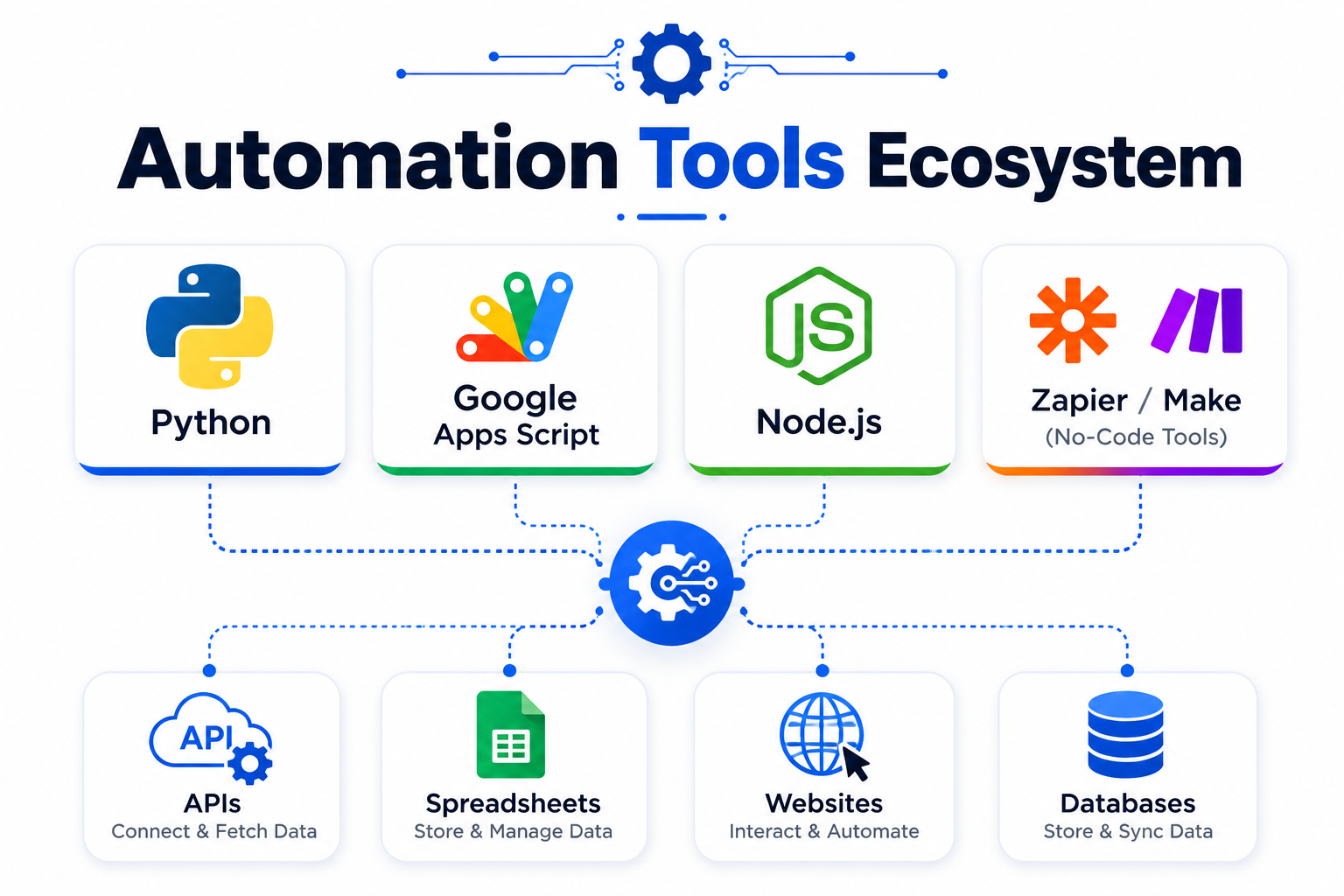
Python
The most versatile option. Can do almost anything:
- Web scraping
- API integrations
- Data analysis
- Report generation
Libraries:
requests— HTTP requestsBeautifulSoup— HTML parsingpandas— Data manipulationselenium— Browser automation
Google Apps Script
Free, runs in the cloud, integrates with Google Sheets.
Good for:
- Simple automations
- Spreadsheet-based workflows
- Scheduled tasks
- Google Search Console data
Node.js
JavaScript-based alternative to Python.
Libraries:
axios— HTTP requestscheerio— HTML parsingpuppeteer— Browser automation
No-Code Options
Not a developer? These help:
- Zapier (connects apps)
- Make/Integromat (workflow automation)
- n8n (open-source automation)
- Google Sheets + ImportXML
Less flexible but accessible.
Practical Automation Examples
1. Automated Rank Tracking
Check where your pages rank for target keywords.
Basic Python approach:
import requests
from bs4 import BeautifulSoup

def check_ranking(keyword, domain):
    url = f"https://www.google.com/search?q={keyword.replace(' ', '+')}"
    headers = {'User-Agent': 'Mozilla/5.0'}

    response = requests.get(url, headers=headers)
    soup = BeautifulSoup(response.text, 'html.parser')

    # Find all search results
    results = soup.select('div.g')

    for position, result in enumerate(results, 1):
        link = result.select_one('a')
        if link and domain in link.get('href', ''):
            return position

    return "Not in top 10"

# Usage
ranking = check_ranking("web development services", "duodev.in")
print(f"Ranking: {ranking}")
Better approach: Use APIs from SEMrush, Ahrefs, or similar tools. More reliable and doesn't risk getting blocked.
2. Site Audit Automation
Check pages for common SEO issues.
import requests
from bs4 import BeautifulSoup
import pandas as pd

def audit_page(url):
    try:
        response = requests.get(url, timeout=10)
        soup = BeautifulSoup(response.text, 'html.parser')

        # Extract SEO elements
        title = soup.title.string if soup.title else None
        meta_desc = soup.find('meta', {'name': 'description'})
        h1 = soup.find('h1')
        canonical = soup.find('link', {'rel': 'canonical'})

        return {
            'url': url,
            'status_code': response.status_code,
            'title': title,
            'title_length': len(title) if title else 0,
            'meta_description': meta_desc['content'] if meta_desc else None,
            'has_h1': bool(h1),
            'has_canonical': bool(canonical),
            'load_time': response.elapsed.total_seconds()
        }
    except Exception as e:
        return {'url': url, 'error': str(e)}

# Audit multiple pages
urls = ['https://example.com/page1', 'https://example.com/page2']
results = [audit_page(url) for url in urls]
df = pd.DataFrame(results)
df.to_csv('site_audit.csv', index=False)
Expand to check:
- Image alt text
- Internal links
- Schema markup
- Mobile viewport
- Page speed (via API)
3. Competitor Monitoring
Track changes on competitor websites.
import requests
import hashlib
import json
from datetime import datetime

def check_for_changes(url, previous_hash_file='hashes.json'):
    # Get current content
    response = requests.get(url)
    current_hash = hashlib.md5(response.text.encode()).hexdigest()

    # Load previous hashes
    try:
        with open(previous_hash_file, 'r') as f:
            hashes = json.load(f)
    except FileNotFoundError:
        hashes = {}

    # Compare
    previous_hash = hashes.get(url)
    changed = previous_hash != current_hash

    # Update stored hash
    hashes[url] = current_hash
    with open(previous_hash_file, 'w') as f:
        json.dump(hashes, f)

    return {
        'url': url,
        'changed': changed,
        'checked_at': datetime.now().isoformat()
    }

# Monitor competitor pages
competitors = [
    'https://competitor1.com/pricing',
    'https://competitor2.com/features'
]

for url in competitors:
    result = check_for_changes(url)
    if result['changed']:
        print(f"CHANGE DETECTED: {url}")
Set up to email alerts when changes occur.
4. Google Search Console Automation
Pull data directly from GSC using their API.
from google.oauth2 import service_account
from googleapiclient.discovery import build

# Setup
SCOPES = ['https://www.googleapis.com/auth/webmasters.readonly']
SERVICE_ACCOUNT_FILE = 'credentials.json'

credentials = service_account.Credentials.from_service_account_file(
    SERVICE_ACCOUNT_FILE, scopes=SCOPES
)
service = build('searchconsole', 'v1', credentials=credentials)

def get_search_analytics(site_url, start_date, end_date):
    request = {
        'startDate': start_date,
        'endDate': end_date,
        'dimensions': ['query', 'page'],
        'rowLimit': 1000
    }

    response = service.searchanalytics().query(
        siteUrl=site_url,
        body=request
    ).execute()

    return response.get('rows', [])

# Usage
data = get_search_analytics(
    'https://example.com',
    '2026-06-01',
    '2026-06-30'
)

# Export to CSV
import pandas as pd
df = pd.DataFrame(data)
df.to_csv('gsc_data.csv', index=False)
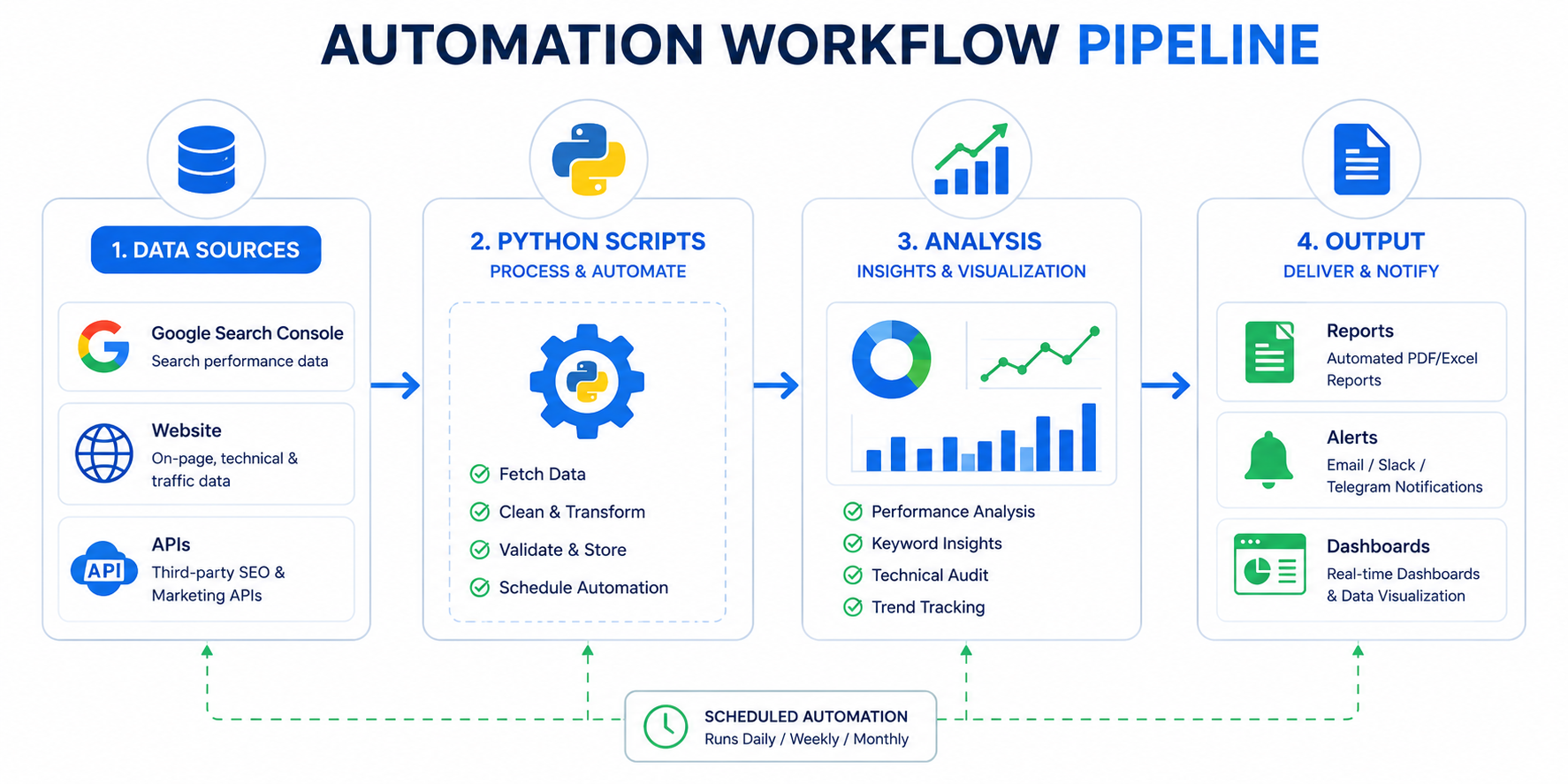
Schedule this weekly for automated reporting.
5. Content Analysis
Analyze content gaps and opportunities.
from collections import Counter
import requests
from bs4 import BeautifulSoup
import re

def analyze_content(url):
    response = requests.get(url)
    soup = BeautifulSoup(response.text, 'html.parser')

    # Remove scripts and styles
    for tag in soup(['script', 'style', 'nav', 'footer']):
        tag.decompose()

    text = soup.get_text()
    words = re.findall(r'\b[a-z]{3,}\b', text.lower())

    # Word frequency
    word_freq = Counter(words)

    # Count headings
    headings = {
        'h1': len(soup.find_all('h1')),
        'h2': len(soup.find_all('h2')),
        'h3': len(soup.find_all('h3'))
    }

    # Count links
    links = soup.find_all('a', href=True)
    internal = [l for l in links if 'example.com' in l.get('href', '')]
    external = [l for l in links if l not in internal]

    return {
        'url': url,
        'word_count': len(words),
        'unique_words': len(word_freq),
        'top_words': word_freq.most_common(20),
        'headings': headings,
        'internal_links': len(internal),
        'external_links': len(external)
    }
Compare against top-ranking competitors to find gaps.
Scheduling Automated Tasks
Cron Jobs (Linux/Mac)
Run scripts on schedule:
# Edit crontab
crontab -e

# Run daily at 8 AM
0 8 * * * /usr/bin/python3 /path/to/script.py

# Run every Monday at 9 AM
0 9 * * 1 /usr/bin/python3 /path/to/weekly_report.py
Task Scheduler (Windows)
Use Windows Task Scheduler for similar functionality.
Cloud Options
For reliability without maintaining servers:
- GitHub Actions (free for public repos)
- Google Cloud Functions
- AWS Lambda
- PythonAnywhere
Automation Best Practices
Respect Rate Limits
Don't hammer websites with requests:
import time

for url in urls:
    result = process_url(url)
    time.sleep(2)  # Wait 2 seconds between requests
Excessive requests get you blocked.
Handle Errors Gracefully
Things fail. Plan for it:
import logging

logging.basicConfig(filename='seo_automation.log', level=logging.INFO)

try:
    result = risky_operation()
except Exception as e:
    logging.error(f"Error: {e}")
    # Continue with next item, don't crash
Store Historical Data
Track changes over time:
import pandas as pd
from datetime import datetime

new_data = collect_seo_data()
new_data['date'] = datetime.now().date()

# Append to historical file
try:
    historical = pd.read_csv('historical_data.csv')
    combined = pd.concat([historical, new_data])
except FileNotFoundError:
    combined = new_data

combined.to_csv('historical_data.csv', index=False)
Alert on Anomalies
Get notified when things go wrong:
import smtplib

def send_alert(subject, message):
    # Simple email alert
    server = smtplib.SMTP('smtp.gmail.com', 587)
    server.starttls()
    server.login('your_email', 'password')
    server.sendmail('your_email', 'your_email', f"Subject: {subject}\n\n{message}")
    server.quit()

# Usage
if ranking_drop > 10:
    send_alert("Ranking Alert", f"Position dropped by {ranking_drop}")
Or use Slack webhooks for team notifications.
Common Automation Use Cases
| Task | Frequency | Complexity |
|---|---|---|
| Rank tracking | Daily/Weekly | Medium |
| Site audits | Weekly | Medium |
| Competitor monitoring | Daily | Low |
| GSC data export | Weekly | Low |
| Backlink monitoring | Daily | Medium |
| Content analysis | Monthly | Medium |
| Report generation | Weekly/Monthly | Low |
| Index status checking | Daily | Low |
Start with simple tasks. Build complexity over time.
Tools That Automate Without Code
If coding isn't your thing:
Google Sheets + APIs
- Use IMPORTXML for scraping
- Connect to GSC via add-ons
- Build dashboards with Data Studio
Screaming Frog Scheduler
- Schedule automated crawls
- Export data automatically
- Set up change alerts
SEO Platforms
Most paid tools (Ahrefs, SEMrush, Moz) have built-in automation:
- Scheduled reports
- Alert systems
- API access
Start Small, Then Expand
Don't automate everything at once:
- Week 1: Automate one repetitive task
- Week 2: Add error handling and logging
- Week 3: Add another task
- Month 2: Connect tasks into workflows
- Ongoing: Refine and expand
Automation compounds. Small scripts become powerful systems.
Need help building SEO automation or custom tools? Contact Duo Dev for development services and technical consulting.