
You can create the best content in the world, but if nobody searches for it, nobody finds it.
Keyword research is how you discover what people actually search for. It's the foundation of SEO—everything else builds on it.
This guide covers keyword research from scratch. No prior knowledge needed. By the end, you'll know how to find keywords, evaluate them, and build a strategy that drives traffic.
What Is Keyword Research?
Keyword research is the process of finding and analyzing search terms people enter into search engines.
It answers questions like:
- What are people searching for in my niche?
- How many people search for specific terms?
- How hard would it be to rank for these terms?
- What content should I create?
Without keyword research, you're guessing. With it, you're informed.
Why Keyword Research Matters
Traffic Potential
Some keywords get searched thousands of times daily. Others, barely once a month. Keyword research helps you target terms with actual traffic potential.
Competition Assessment
Some keywords have thousands of competing pages from established sites. Others are wide open. Knowing the competitive landscape guides realistic targeting.
Content Direction
Instead of guessing what to write about, keyword research reveals what your audience already wants to know.
ROI Focus
Targeting the right keywords means attracting visitors likely to convert—not just any visitors.
Understanding Search Intent
Before finding keywords, understand why people search.
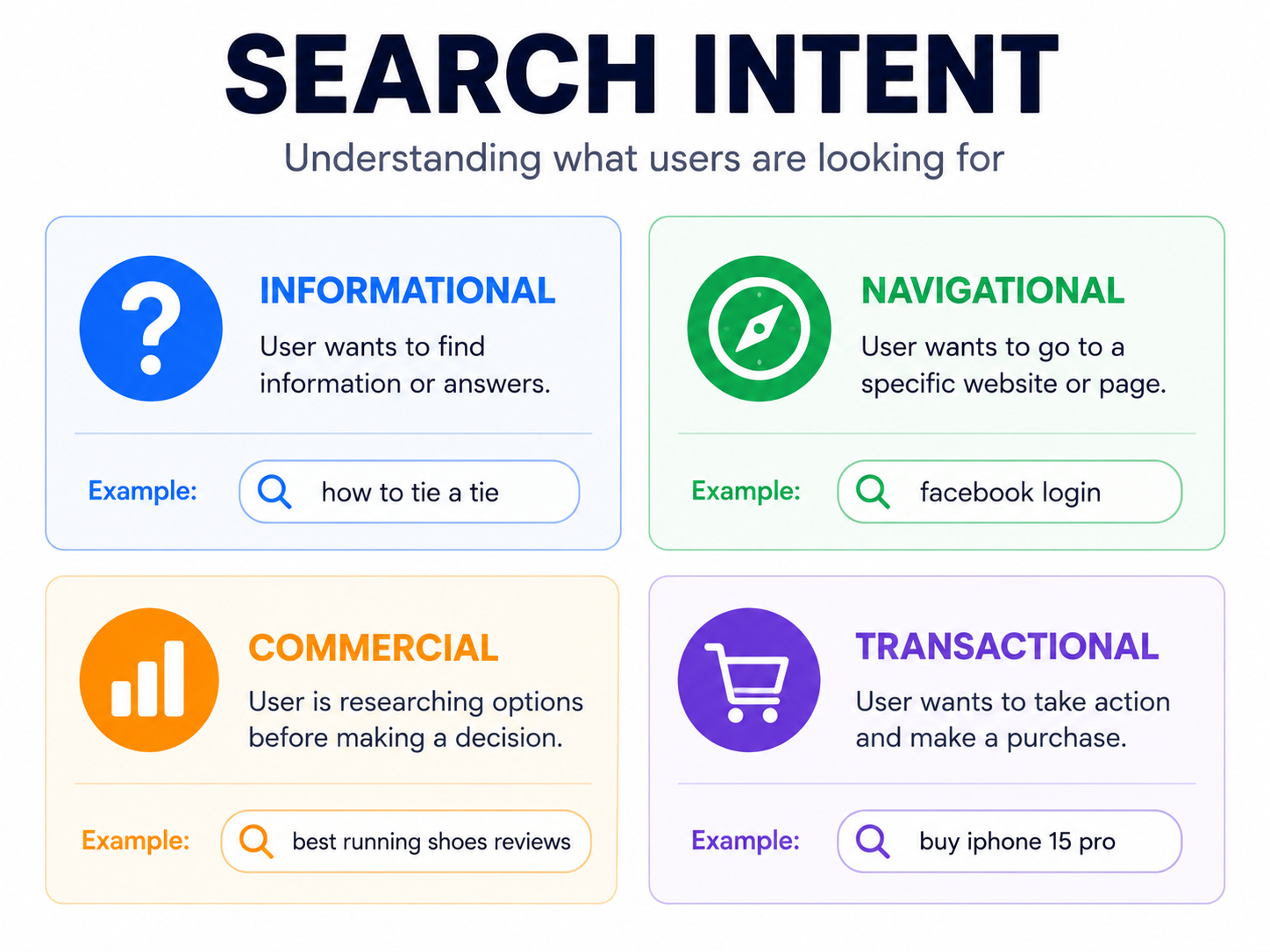
Types of Search Intent
Informational: Seeking information
- "what is keyword research"
- "how to train a puppy"
- "best practices for SEO"
Navigational: Looking for a specific site
- "Facebook login"
- "Spotify web player"
- "Amazon customer service"
Commercial: Researching before purchase
- "best running shoes 2026"
- "iPhone vs Samsung comparison"
- "CRM software reviews"
Transactional: Ready to buy
- "buy Nike Air Max"
- "Spotify premium subscription"
- "hire web developer"
Why Intent Matters
If you write informational content for a transactional keyword, you won't rank—because Google shows shopping results.
Match your content type to the intent:
- Informational → Blog posts, guides
- Commercial → Comparison articles, reviews
- Transactional → Product pages, service pages
Check the current search results for any keyword. What types of pages rank? That's what Google thinks the intent is.
Keyword Metrics to Understand
Search Volume
How many times a keyword is searched monthly.
- High volume (10,000+): Lots of potential traffic, usually competitive
- Medium volume (1,000-10,000): Good balance
- Low volume (< 1,000): Easier to rank, less traffic
Volume isn't everything. A low-volume keyword with high purchase intent might be more valuable than a high-volume informational keyword.
Keyword Difficulty (KD)
How hard it is to rank on page one. Usually 0-100 scale.
- 0-30: Low difficulty, achievable for new sites
- 30-60: Medium difficulty, requires solid content and some backlinks
- 60-100: High difficulty, dominated by authoritative sites
New sites should target lower difficulty keywords initially.
Cost Per Click (CPC)
What advertisers pay per click for this keyword.
High CPC indicates commercial value—advertisers are willing to pay because the keyword converts.
Competition
How many sites compete for this keyword.
Distinction: Keyword difficulty measures ranking difficulty. Competition often refers to advertising competition.
Trend
Is search volume growing, stable, or declining?
Avoid declining keywords. Prioritize growing ones.
Free Keyword Research Methods
Google Autocomplete
Start typing in Google. See what it suggests.
Type: "how to build a"
Suggestions: "how to build a website," "how to build a house," "how to build a resume"
These are real searches. Google suggests what people actually search for.
Google "People Also Ask"
Search any query. Look for the "People also ask" box.
Each question represents a search query. Click to expand for more questions.
Google "Related Searches"
Scroll to the bottom of search results. "Related searches" shows connected keywords.
Google Keyword Planner
Free with a Google Ads account (you don't have to run ads).
Provides:
- Search volume ranges
- Competition levels
- Keyword suggestions
Limited compared to paid tools, but useful for beginners.
AnswerThePublic
Enter a keyword, get questions people ask:
- What
- How
- Why
- Where
- When
- Which
Great for informational content ideas.
Also Asked
Similar to AnswerThePublic. Shows question hierarchies for any topic.
Google Trends
See keyword popularity over time. Compare keywords. Identify seasonal patterns.
Paid Keyword Research Tools
When you're ready to invest:
Ahrefs
- Comprehensive keyword database
- Accurate difficulty scores
- Competitor analysis
- Content gap analysis
SEMrush
- Large keyword database
- Position tracking
- Site auditing
- Content optimization
Moz Keyword Explorer
- User-friendly interface
- Keyword suggestions
- SERP analysis
- Priority scores
Ubersuggest
- Affordable option
- Keyword suggestions
- Content ideas
- Competitor analysis
Most offer free trials. Try before committing.
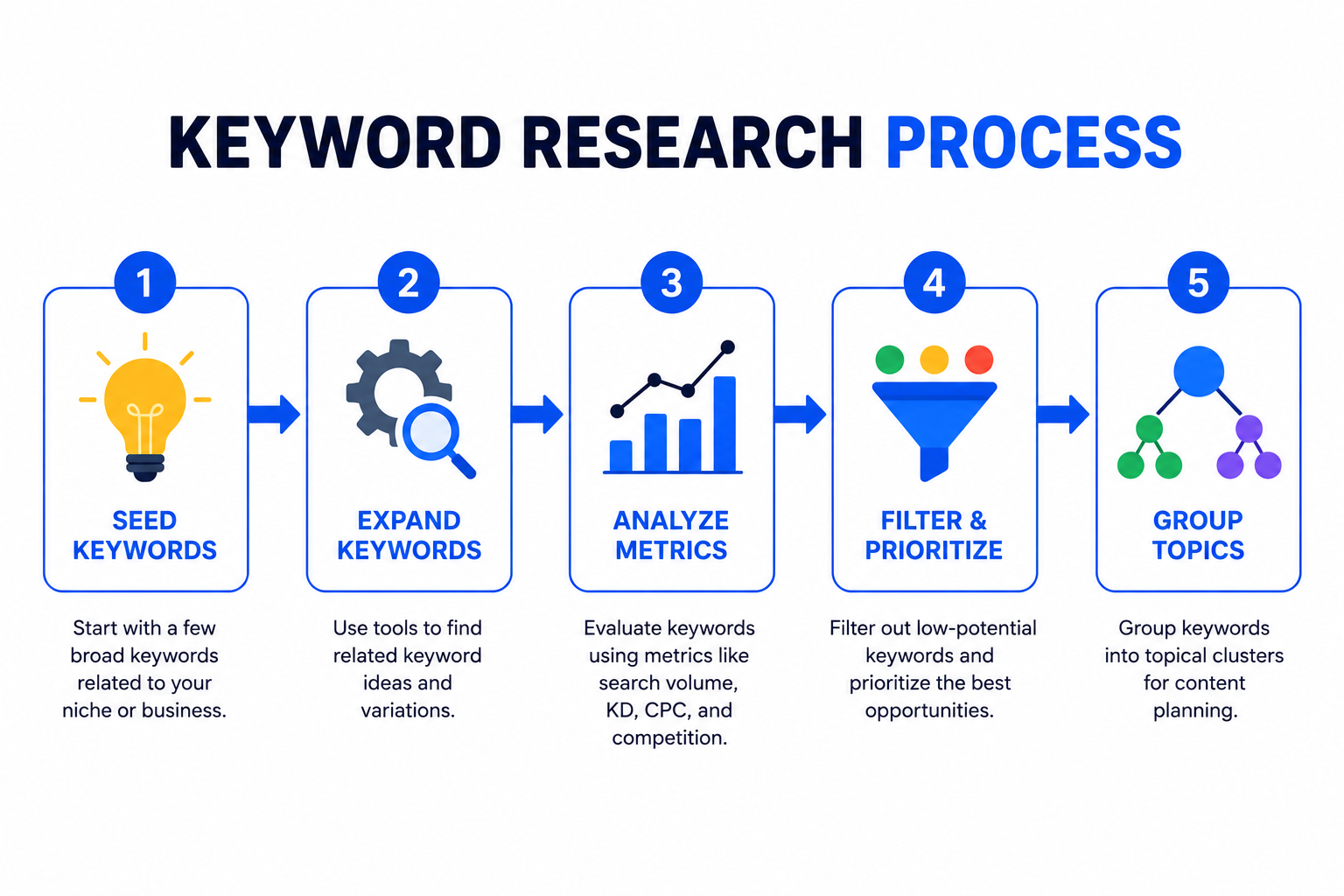
The Keyword Research Process
Step 1: Brainstorm Seed Keywords
Start with broad topics related to your business.
If you're a web development agency:
- web development
- website design
- web application
- mobile app development
These are seed keywords—starting points for deeper research.
Step 2: Expand with Tools
Enter seed keywords into research tools. Generate hundreds of related keywords.
From "web development," you might find:
- "web development services"
- "web development cost"
- "how to learn web development"
- "web development company near me"
- "web development vs web design"
Step 3: Analyze Metrics
For each keyword, check:
- Search volume: Is there traffic?
- Difficulty: Can you realistically rank?
- Intent: Does it match what you offer?
Step 4: Filter and Prioritize
Remove keywords that don't fit:
- Too difficult (>60 KD for new sites)
- Wrong intent (informational when you need commercial)
- Irrelevant to your business
Prioritize keywords that:
- Match your content capabilities
- Align with business goals
- Have reasonable difficulty
- Show positive trends
Step 5: Group by Topic
Organize keywords into topic clusters:
Topic: Website Development
- web development services
- custom website development
- website development cost
- hire web developer
Topic: Web Development Learning
- how to learn web development
- web development for beginners
- full stack development guide
Each cluster becomes a content theme.
Finding Low-Competition Keywords
New sites can't compete for everything. Find keywords where you can win.
Long-Tail Keywords
Longer, more specific phrases:
- Short-tail: "web development" (high competition)
- Long-tail: "web development cost for small business" (lower competition)
Long-tail keywords have less volume but higher specificity and lower competition.
Question Keywords
"How to," "what is," "why does"—question keywords often have lower difficulty.
These work well for blog content.
Location-Based Keywords
Add location for local businesses:
- "web developer" (global, competitive)
- "web developer in [city]" (local, less competitive)
Niche-Specific Keywords
Industry-specific terms your competitors might miss:
- Generic: "CRM software"
- Niche: "CRM for real estate agents"
Analyzing Competitor Keywords
See what competitors rank for:
Process
- Enter competitor URL into Ahrefs/SEMrush
- View their organic keywords
- Find keywords you don't rank for
- Identify gaps you can fill
Content Gap Analysis
Compare your site to 3-4 competitors:
- Keywords they all rank for (you should too)
- Keywords some rank for (opportunities)
- Keywords none rank for (untapped potential)
Building Your Keyword Strategy
Match Keywords to Content Types
| Keyword Type | Content Format |
|---|---|
| Informational | Blog posts, guides, tutorials |
| Commercial | Comparison pages, reviews |
| Transactional | Service pages, product pages |
| Navigational | Homepage, branded pages |
Create a Keyword Map
Assign primary keywords to specific pages:
| Page | Primary Keyword | Secondary Keywords |
|---|---|---|
| /services/web-development | web development services | custom web development, hire web developer |
| /blog/web-dev-cost | website development cost | how much does a website cost, web design pricing |
One primary keyword per page. Supporting keywords can overlap.
Balance Quick Wins and Long-Term Goals
Quick wins: Low-difficulty keywords you can rank for soon
Long-term: Higher-difficulty keywords that require authority building
A healthy strategy includes both.
Common Keyword Research Mistakes
Targeting Only High-Volume Keywords
Volume means competition. New sites can't win these battles yet. Start smaller.
Ignoring Search Intent
Traffic from wrong-intent keywords doesn't convert. Match content to intent.
Keyword Stuffing
Don't force keywords unnaturally into content. Google detects and penalizes this.
Not Updating Research
Search behavior changes. Revisit keyword research quarterly.
Focusing Only on Rankings
Rankings matter, but conversions matter more. A #1 ranking for a keyword that doesn't convert is worthless.
Taking Action
Keyword research is only valuable if you act on it:
- Create content targeting your chosen keywords
- Optimize existing pages for discovered opportunities
- Track rankings over time
- Iterate based on results
For implementation, see our On-page SEO Checklist (2026) and Technical SEO Guide for Developers.
Need help with keyword research or SEO strategy? Contact Duo Dev for SEO consulting and content strategy services.