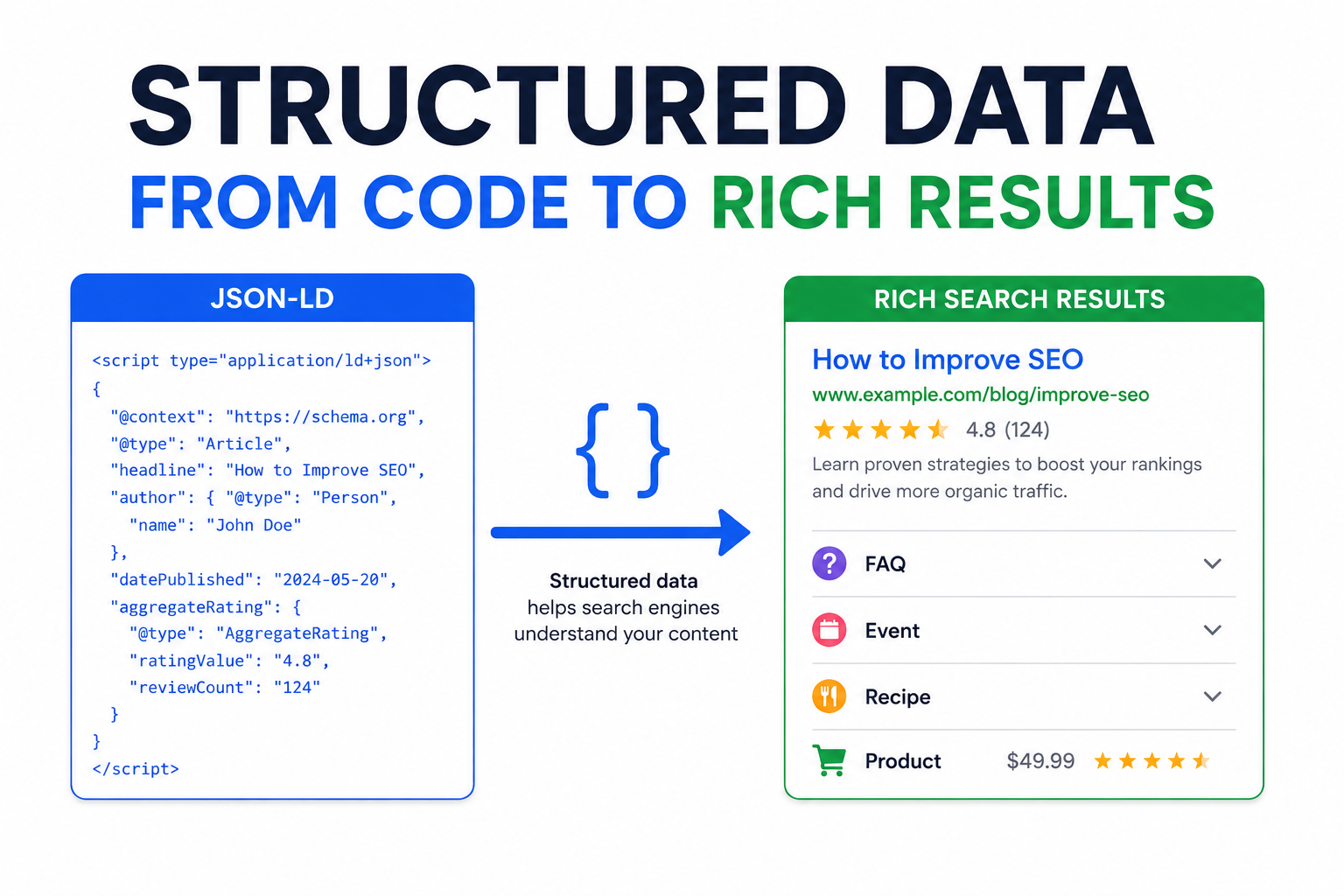
When you search Google, some results stand out. They have star ratings, prices, FAQs, recipes with images, event dates. These enhanced results get more clicks.
The secret? Structured data.
Structured data is code you add to your pages that helps search engines understand your content. When implemented correctly, it can unlock rich results—those eye-catching search features that boost click-through rates.
Let's learn how to speak Google's language.
What Is Structured Data?
Structured data is a standardized format for providing information about your page content. It tells search engines explicitly what things on your page represent.
Without structured data, Google infers meaning from your content. With structured data, you state meaning directly.
Without structured data:
Google sees text that looks like a recipe—ingredients, steps, times.
With structured data:
You explicitly tell Google: "This is a Recipe. It takes 30 minutes. Here are the ingredients."
The Schema.org Standard
Schema.org is the vocabulary search engines agreed to use. It defines hundreds of types and properties to describe content.
Types represent things: Product, Article, Recipe, Event, Organization, Person, etc.
Properties describe attributes: name, description, price, rating, author, etc.
Most major search engines (Google, Bing, Yahoo) understand Schema.org markup.
Formats for Structured Data
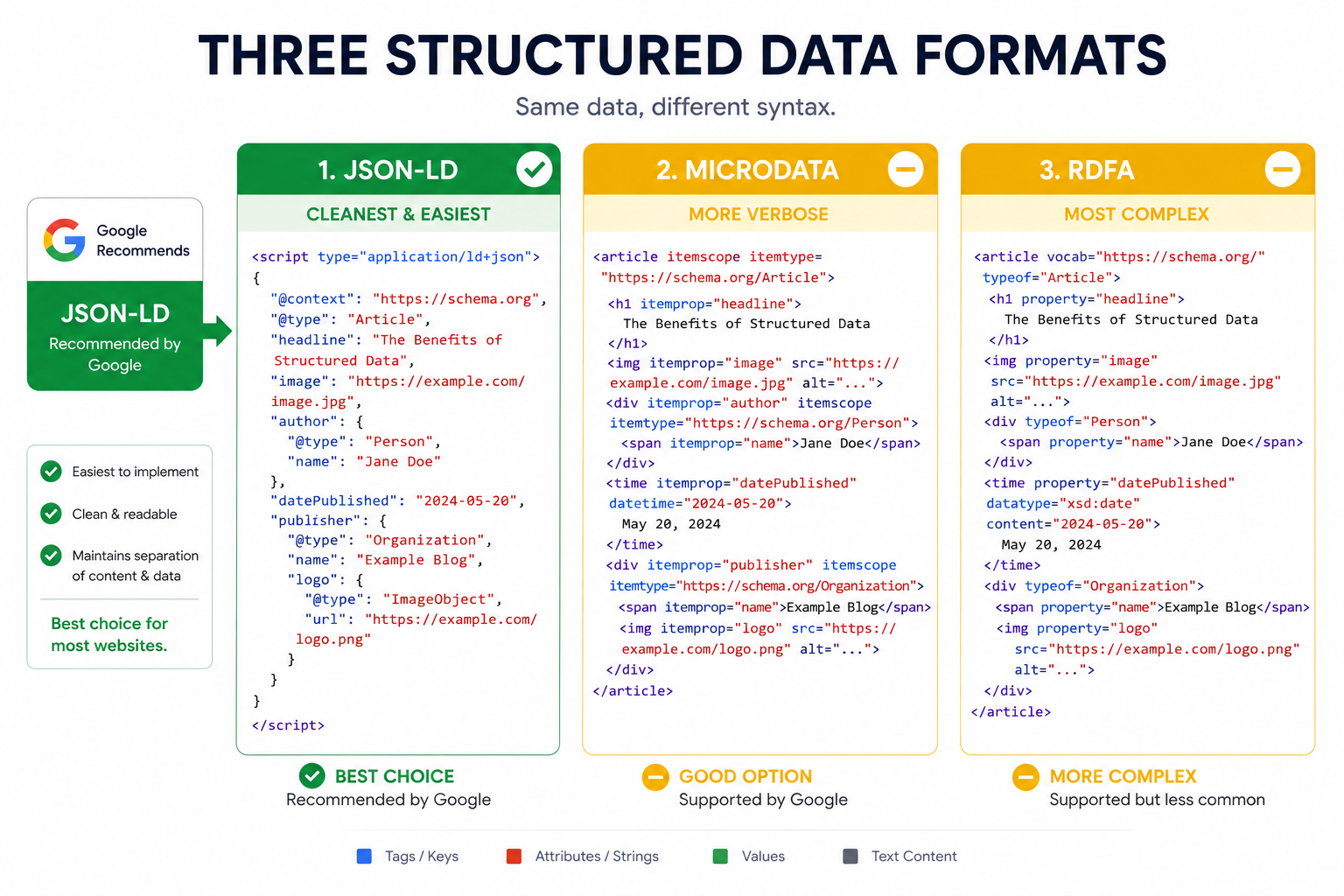
Three formats exist for adding structured data:
JSON-LD (Recommended)
JSON-LD is a script block added to your HTML. Google recommends this format.
<script type="application/ld+json">
{
  "@context": "https://schema.org",
  "@type": "Article",
  "headline": "How to Add Structured Data",
  "author": {
    "@type": "Person",
    "name": "John Doe"
  },
  "datePublished": "2026-06-28"
}
</script>
Advantages:
- Separate from HTML (easier to maintain)
- Can be added anywhere on page
- Doesn't affect page rendering
- Easy to generate dynamically
Microdata
Microdata adds attributes to existing HTML elements:
<article itemscope itemtype="https://schema.org/Article">
  <h1 itemprop="headline">How to Add Structured Data</h1>
  <span itemprop="author" itemscope itemtype="https://schema.org/Person">
    <span itemprop="name">John Doe</span>
  </span>
</article>
Drawbacks:
- Mixed with HTML (harder to maintain)
- Verbose
- Must modify existing markup
RDFa
Similar to Microdata, with different attributes:
<article vocab="https://schema.org/" typeof="Article">
  <h1 property="headline">How to Add Structured Data</h1>
  <span property="author" typeof="Person">
    <span property="name">John Doe</span>
  </span>
</article>
Recommendation: Use JSON-LD. It's what Google prefers, and it's cleanest to implement.
Common Schema Types
Organization
Every business website should have Organization schema:
{
  "@context": "https://schema.org",
  "@type": "Organization",
  "name": "Duo Dev Technologies",
  "url": "https://duodev.in",
  "logo": "https://duodev.in/logo.png",
  "description": "Web and mobile application development",
  "address": {
    "@type": "PostalAddress",
    "addressLocality": "City Name",
    "addressCountry": "IN"
  },
  "contactPoint": {
    "@type": "ContactPoint",
    "telephone": "+91-XXX-XXXX",
    "contactType": "customer service"
  },
  "sameAs": [
    "https://twitter.com/duodev",
    "https://linkedin.com/company/duodev"
  ]
}
Add to homepage. This helps Google understand your business and may enable Knowledge Panel features.
LocalBusiness
For businesses with physical locations:
{
  "@context": "https://schema.org",
  "@type": "LocalBusiness",
  "name": "Business Name",
  "image": "https://example.com/photo.jpg",
  "address": {
    "@type": "PostalAddress",
    "streetAddress": "123 Main St",
    "addressLocality": "City",
    "addressRegion": "State",
    "postalCode": "12345",
    "addressCountry": "US"
  },
  "geo": {
    "@type": "GeoCoordinates",
    "latitude": 40.7128,
    "longitude": -74.0060
  },
  "telephone": "+1-555-123-4567",
  "openingHoursSpecification": [
    {
      "@type": "OpeningHoursSpecification",
      "dayOfWeek": ["Monday", "Tuesday", "Wednesday", "Thursday", "Friday"],
      "opens": "09:00",
      "closes": "17:00"
    }
  ]
}
Article/BlogPosting
For blog posts and articles:
{
  "@context": "https://schema.org",
  "@type": "BlogPosting",
  "headline": "Structured Data and Schema Markup Guide",
  "description": "Learn how to implement structured data...",
  "image": "https://example.com/article-image.jpg",
  "datePublished": "2026-06-28",
  "dateModified": "2026-06-28",
  "author": {
    "@type": "Organization",
    "name": "Duo Dev Team"
  },
  "publisher": {
    "@type": "Organization",
    "name": "Duo Dev",
    "logo": {
      "@type": "ImageObject",
      "url": "https://duodev.in/logo.png"
    }
  }
}
Product
For e-commerce product pages:
{
  "@context": "https://schema.org",
  "@type": "Product",
  "name": "Widget Pro",
  "image": "https://example.com/widget.jpg",
  "description": "The best widget on the market",
  "brand": {
    "@type": "Brand",
    "name": "WidgetCo"
  },
  "sku": "WP-12345",
  "offers": {
    "@type": "Offer",
    "url": "https://example.com/widget-pro",
    "priceCurrency": "USD",
    "price": "99.99",
    "availability": "https://schema.org/InStock",
    "priceValidUntil": "2026-12-31"
  },
  "aggregateRating": {
    "@type": "AggregateRating",
    "ratingValue": "4.5",
    "reviewCount": "142"
  }
}
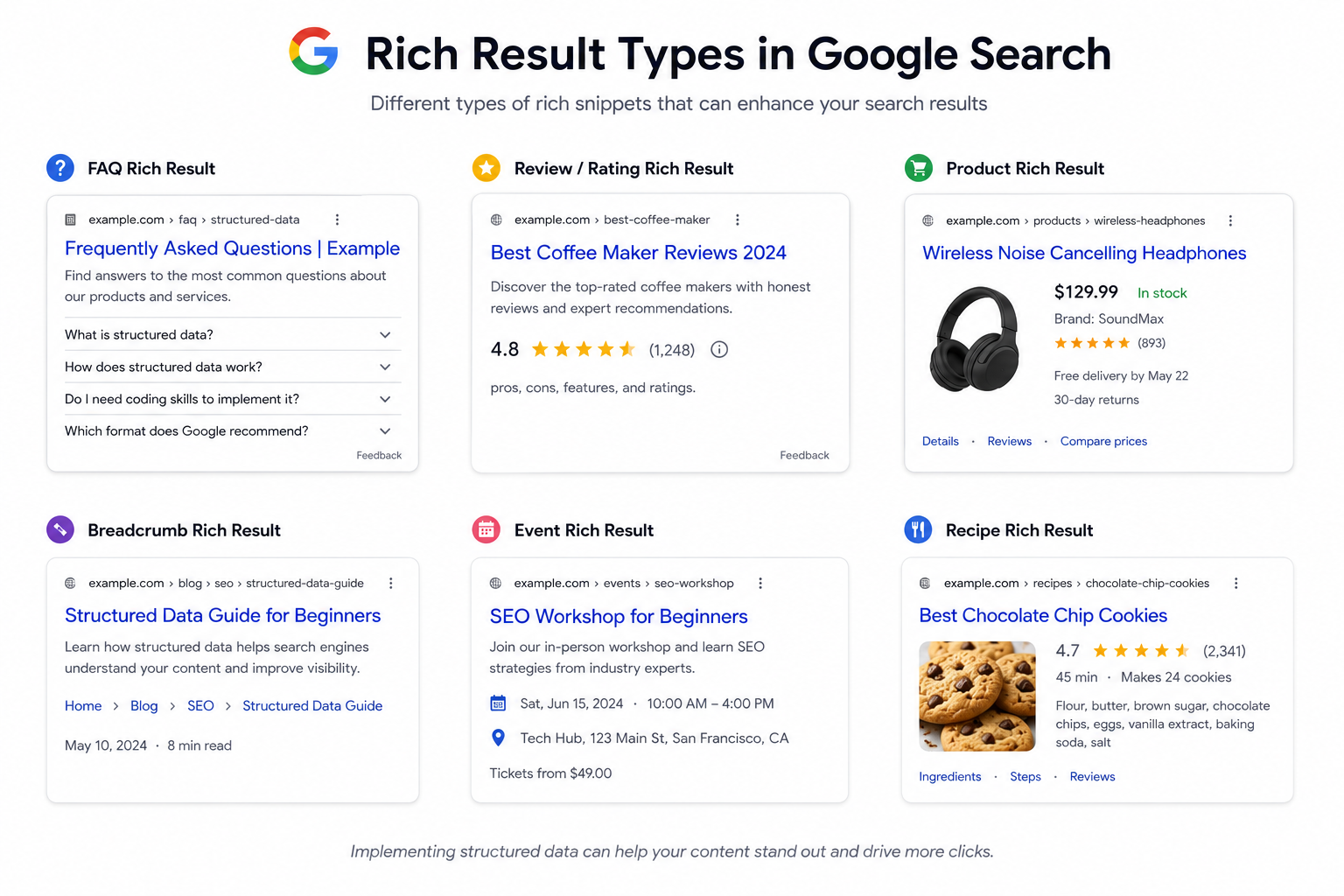
Products with proper schema can show prices, availability, and ratings in search results.
FAQPage
For FAQ content:
{
  "@context": "https://schema.org",
  "@type": "FAQPage",
  "mainEntity": [
    {
      "@type": "Question",
      "name": "What is structured data?",
      "acceptedAnswer": {
        "@type": "Answer",
        "text": "Structured data is code that helps search engines understand your content."
      }
    },
    {
      "@type": "Question",
      "name": "How do I add structured data?",
      "acceptedAnswer": {
        "@type": "Answer",
        "text": "Add JSON-LD script blocks to your HTML pages."
      }
    }
  ]
}
FAQ schema can display expandable questions directly in search results—taking up significant space.
BreadcrumbList
For navigation breadcrumbs:
{
  "@context": "https://schema.org",
  "@type": "BreadcrumbList",
  "itemListElement": [
    {
      "@type": "ListItem",
      "position": 1,
      "name": "Home",
      "item": "https://example.com/"
    },
    {
      "@type": "ListItem",
      "position": 2,
      "name": "Blog",
      "item": "https://example.com/blog/"
    },
    {
      "@type": "ListItem",
      "position": 3,
      "name": "SEO",
      "item": "https://example.com/blog/seo/"
    }
  ]
}
Breadcrumbs appear in search results, showing page hierarchy.
HowTo
For step-by-step instructions:
{
  "@context": "https://schema.org",
  "@type": "HowTo",
  "name": "How to Add Structured Data to Your Website",
  "totalTime": "PT30M",
  "step": [
    {
      "@type": "HowToStep",
      "name": "Choose Schema Type",
      "text": "Identify which schema type fits your content."
    },
    {
      "@type": "HowToStep",
      "name": "Write JSON-LD",
      "text": "Create the JSON-LD script with required properties."
    },
    {
      "@type": "HowToStep",
      "name": "Test and Validate",
      "text": "Use Google's Rich Results Test to validate."
    }
  ]
}
Event
For events and happenings:
{
  "@context": "https://schema.org",
  "@type": "Event",
  "name": "Tech Conference 2026",
  "startDate": "2026-09-15T09:00",
  "endDate": "2026-09-17T17:00",
  "location": {
    "@type": "Place",
    "name": "Convention Center",
    "address": {
      "@type": "PostalAddress",
      "addressLocality": "San Francisco",
      "addressRegion": "CA",
      "addressCountry": "US"
    }
  },
  "offers": {
    "@type": "Offer",
    "price": "299",
    "priceCurrency": "USD",
    "url": "https://example.com/event-tickets"
  }
}
Implementation Best Practices
Add to Every Relevant Page
Don't add schema to homepage only. Add appropriate types to:
- Organization schema on homepage
- Article/BlogPosting on blog posts
- Product on product pages
- FAQPage on FAQ sections
- BreadcrumbList on all pages
Match Content Accurately
Only add schema for content that exists on the page. If you claim a 5-star rating, it must be visible on the page.
Wrong:
Adding Product schema with price to an informational article.
Right:
Adding Article schema to article pages, Product schema to product pages.
Include Required Properties
Each schema type has required and recommended properties. Check Google's documentation for your specific type.
Missing required properties = schema may be ignored.
Use Specific Types
Schema.org has a hierarchy. Use the most specific type applicable.
Generic: Thing > CreativeWork > Article
Specific: Thing > CreativeWork > Article > BlogPosting
BlogPosting is more specific than Article. Use it for blog posts.
Testing and Validation
Google's Rich Results Test
Test individual URLs:
https://search.google.com/test/rich-results
Shows:
- Whether schema is valid
- What rich results are eligible
- Warnings and errors
Schema Markup Validator
Test schema syntax:
https://validator.schema.org/
Validates schema structure against Schema.org vocabulary.
Google Search Console
Monitor structured data across your site:
- Enhancements reports show coverage
- Error counts by type
- Pages with valid/invalid markup
Check regularly for new errors.
Common Errors
Missing required field:
Field "image" is required
Add the missing property.
Invalid value:
"2026-28-06" is not a valid date
Use proper ISO 8601 format: "2026-06-28"
Type mismatch:
Expected "Thing", got "string"
Use proper nested objects, not strings.
Rich Results Types
Schema markup can enable various rich results:
| Schema Type | Potential Rich Results |
|---|---|
| Article | Article snippets |
| Product | Price, availability, ratings |
| FAQPage | FAQ accordions |
| HowTo | Step-by-step cards |
| Recipe | Recipe cards with images |
| Event | Event listings |
| Review | Star ratings |
| VideoObject | Video thumbnails |
| BreadcrumbList | Breadcrumb trail |
Note: Schema makes you eligible for rich results. It doesn't guarantee them. Google decides what to show.
Dynamic Schema Generation
For CMS and dynamic sites, generate schema programmatically:
// Example: Generate BlogPosting schema
function generateArticleSchema(article) {
  return {
    "@context": "https://schema.org",
    "@type": "BlogPosting",
    "headline": article.title,
    "description": article.excerpt,
    "datePublished": article.publishDate,
    "dateModified": article.updateDate,
    "author": {
      "@type": "Person",
      "name": article.author
    },
    "image": article.featuredImage
  };
}
Inject into page templates. Most CMS platforms have plugins for this.
Schema and SEO
Structured data supports broader SEO efforts:
- Complements your on-page SEO
- Helps with site architecture
Rich results drive higher click-through rates, which indirectly supports rankings.
Getting Started Checklist
- Add Organization schema to homepage
- Add BreadcrumbList to all pages
- Add Article/BlogPosting to blog posts
- Add Product schema to product pages (if applicable)
- Add FAQPage to FAQ sections
- Test with Rich Results Test
- Monitor in Search Console
Start with basics. Expand to other types as relevant to your content.
Need help implementing structured data on your website? Contact Duo Dev for technical SEO and development services.