
A one-second delay in page load time can reduce conversions by 7%. At two seconds, 53% of mobile users abandon the site entirely.
Speed isn't a nice-to-have—it's a requirement.
Google uses page speed as a ranking factor. Users judge credibility based on performance. Your competitors' faster sites steal your visitors.
Let's fix it. Here's a practical guide to making your website faster.
Measuring Current Performance
Before optimizing, know where you stand.
Key Metrics
Largest Contentful Paint (LCP): When the main content becomes visible
- Good: < 2.5 seconds
- Needs Improvement: 2.5-4 seconds
- Poor: > 4 seconds
First Input Delay (FID): Time until the page responds to interaction
- Good: < 100ms
- Needs Improvement: 100-300ms
- Poor: > 300ms
Cumulative Layout Shift (CLS): Visual stability (how much things move)
- Good: < 0.1
- Needs Improvement: 0.1-0.25
- Poor: > 0.25
These are Google's Core Web Vitals—they affect your search rankings.
Testing Tools
Google PageSpeed Insights: Free, shows Core Web Vitals and recommendations
https://pagespeed.web.dev
WebPageTest: Detailed waterfall analysis, multiple locations
https://webpagetest.org
GTmetrix: Performance scores and monitoring
https://gtmetrix.com
Chrome DevTools: Network tab shows what's loading and when
Run tests from multiple locations. Performance varies by geography.
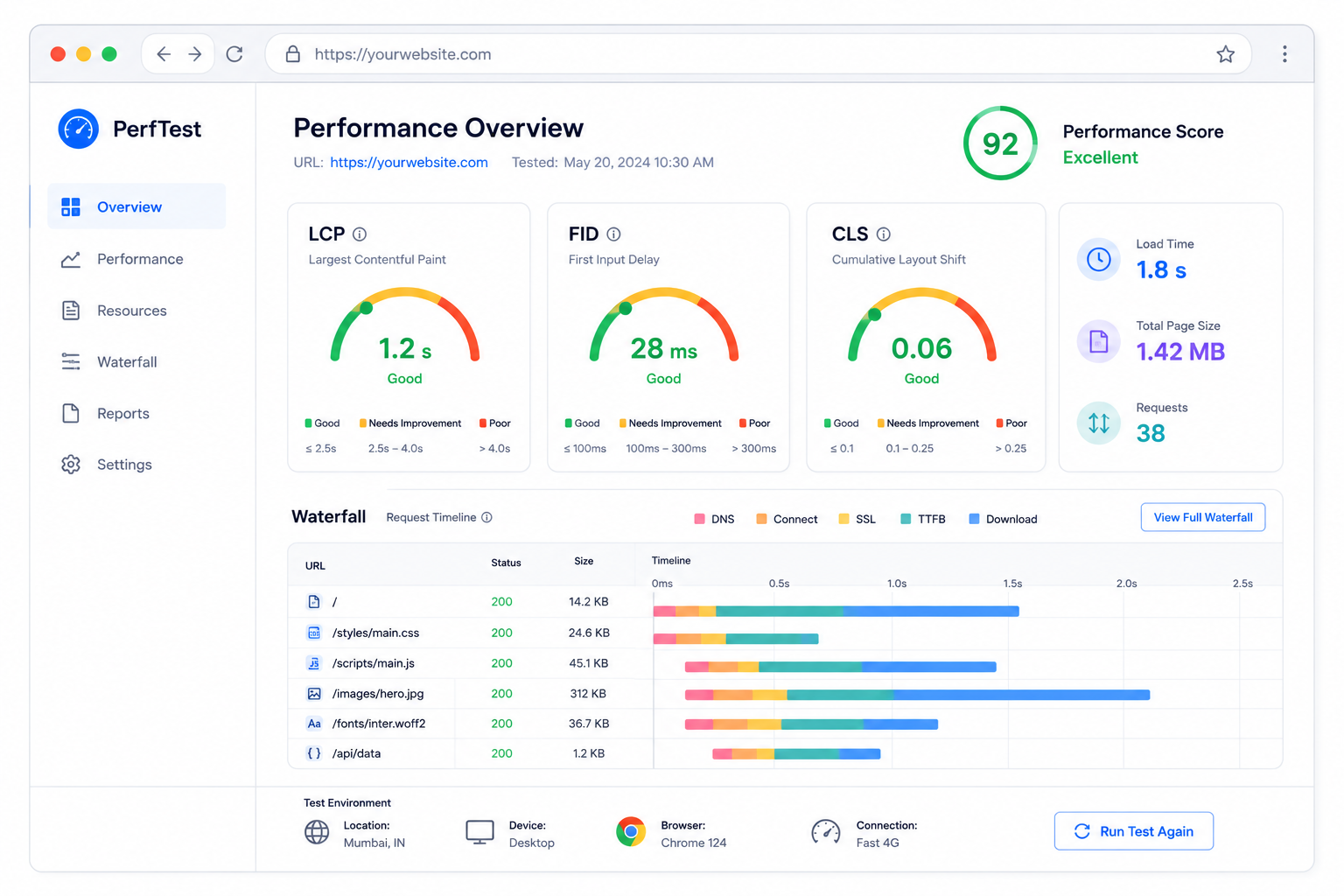
Image Optimization
Images cause most website bloat. They're also the easiest to fix.
Choose the Right Format
| Format | Best For |
|---|---|
| JPEG | Photos with many colors |
| PNG | Graphics with transparency |
| WebP | Modern browsers (30% smaller) |
| AVIF | Newest format (50% smaller) |
| SVG | Icons, logos, simple graphics |
Use WebP with JPEG fallback for maximum compatibility.
Compress Images
Uncompressed images waste bandwidth. Use compression tools:
- ToolByte Image Compressor (online)
- TinyPNG (online)
- ImageOptim (Mac)
- Squoosh (Google's tool)
Aim for quality setting around 80%—visually identical, much smaller file.
Serve Responsive Images
Don't serve 4000px images to phones. Use responsive images:
<img
  src="image-800.webp"
  srcset="image-400.webp 400w,
          image-800.webp 800w,
          image-1200.webp 1200w"
  sizes="(max-width: 600px) 400px,
         (max-width: 1000px) 800px,
         1200px"
  alt="Description"
  loading="lazy"
  width="800"
  height="600"
>
Browsers download the appropriate size.
Lazy Load Images
Don't load images users haven't scrolled to:
<img src="image.jpg" loading="lazy" alt="Description">
The loading="lazy" attribute delays loading until the image approaches the viewport.
Specify Dimensions
Always include width and height:
<img src="photo.jpg" width="800" height="600" alt="Description">
This prevents layout shifts (improves CLS).
Code Optimization
Minify CSS and JavaScript
Minification removes unnecessary characters (whitespace, comments) without affecting functionality.
Before (readable):
.header {
  background-color: #ffffff;
  padding: 20px;
  /* Main header styles */
}
After (minified):
.header{background-color:#fff;padding:20px}
Use ToolByte Code Minifier or build tools like Webpack/Vite.
Remove Unused CSS
Most CSS frameworks include styles you don't use. Tools to help:
- PurgeCSS
- UnCSS
- CSS Modules
A typical Bootstrap site might use only 10% of the CSS. Remove the rest.
Defer Non-Critical JavaScript
Scripts that block rendering slow down load times:
<!-- Bad: blocks parsing -->
<script src="analytics.js"></script>

<!-- Better: loads asynchronously -->
<script src="analytics.js" async></script>

<!-- Best for non-critical: defers execution -->
<script src="analytics.js" defer></script>
async: Downloads asynchronously, executes when ready (can interrupt HTML parsing)defer: Downloads asynchronously, executes after HTML parsing completes
Use defer for most scripts. Only critical scripts should load synchronously.
Inline Critical CSS
CSS blocks rendering. Inline the CSS needed for above-the-fold content:
<head>
  <style>
    /* Critical CSS for initial view */
    .header { ... }
    .hero { ... }
  </style>
  <link rel="stylesheet" href="full-styles.css" media="print" onload="this.media='all'">
</head>
This renders initial content immediately while loading the full stylesheet.
Caching
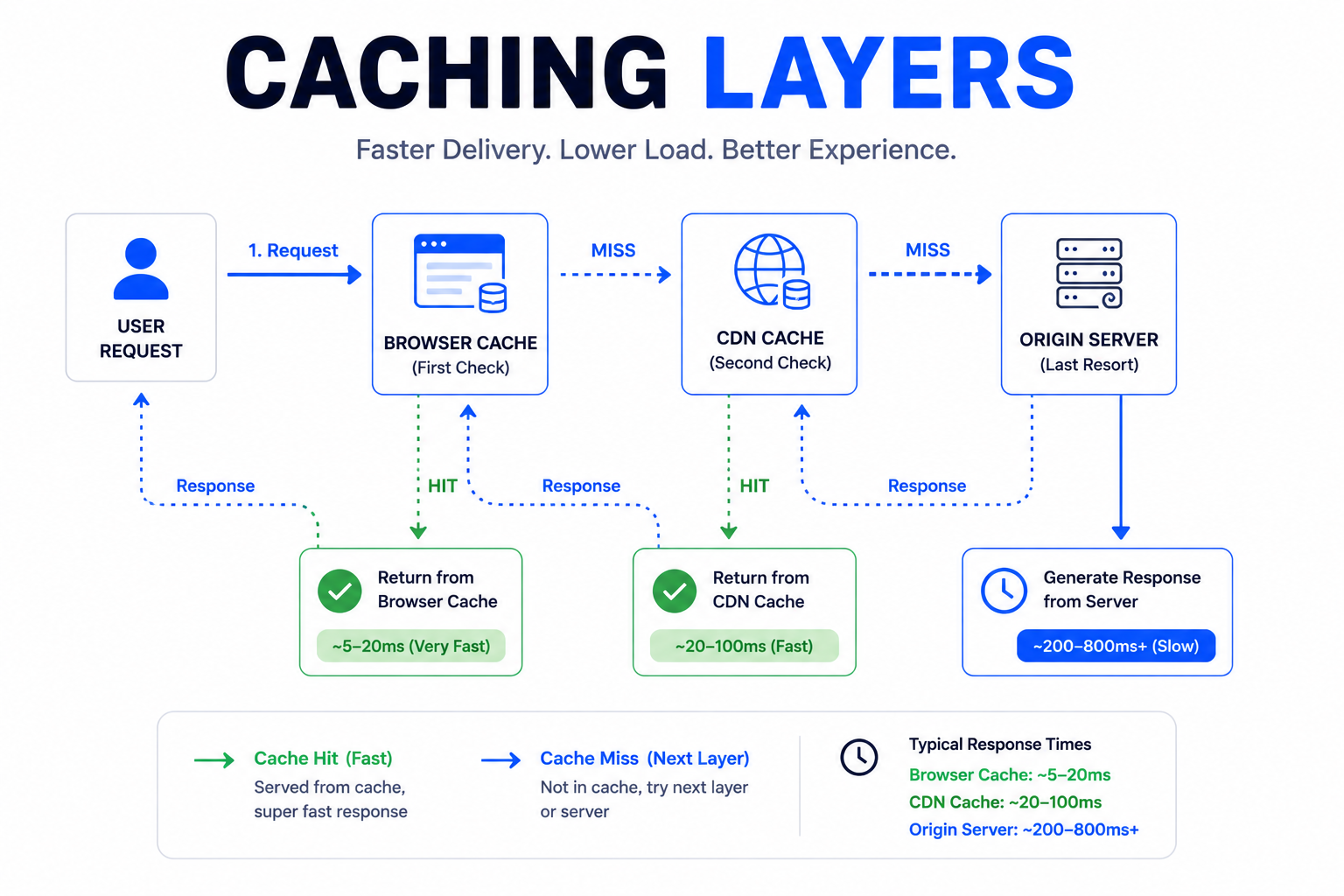
Caching stores copies of resources so they don't need to be downloaded again.
Browser Caching
Set cache headers to tell browsers how long to keep files:
Cache-Control: max-age=31536000
This caches the resource for one year. Use for static assets with versioned filenames.
Cache-Control: max-age=3600
One hour—good for content that might change.
Service Workers
Service workers can cache resources for offline use and faster repeat visits:
// Simple caching service worker
self.addEventListener('install', event => {
  event.waitUntil(
    caches.open('v1').then(cache => {
      return cache.addAll([
        '/',
        '/styles.css',
        '/script.js'
      ]);
    })
  );
});
Progressive Web Apps use this extensively.
Content Delivery Network (CDN)
CDNs distribute your content globally, serving from locations near users.
How CDNs Help
Without CDN: User in Singapore requests from server in Virginia. High latency.
With CDN: User in Singapore requests from edge server in Singapore. Low latency.
Popular CDN Options
- Cloudflare: Free tier available, security features
- Fastly: High performance, real-time purging
- AWS CloudFront: Integrates with AWS
- Vercel/Netlify: Built into their hosting
For static sites, Cloudflare's free tier is an easy win.
What to CDN
- Static assets (images, CSS, JS)
- Fonts
- Video
- Entire static sites (most modern hosting does this)
Dynamic content can be CDN-cached with appropriate strategies.
Server Optimization
Upgrade Hosting
Cheap shared hosting is... slow.
Hosting tiers:
- Shared hosting: Multiple sites on one server. Slowest.
- VPS: Dedicated resources. Better.
- Dedicated server: Your own server. Fast.
- Cloud hosting: Scalable resources. Flexible.
- Edge hosting: Distributed globally. Fastest.
If performance matters, invest in better hosting. Check our Shared Hosting vs VPS vs Cloud Hosting comparison.
Enable Compression
GZIP or Brotli compression reduces transfer size by 70-90%.
Check if enabled:
curl -I -H "Accept-Encoding: gzip" https://yoursite.com
Look for Content-Encoding: gzip in the response.
Optimize Database Queries
Slow database queries = slow pages.
- Index frequently queried columns
- Avoid SELECT * (fetch only needed columns)
- Use query caching
- Consider database read replicas
Use HTTP/2 or HTTP/3
Modern protocols enable:
- Multiplexing (multiple requests over one connection)
- Header compression
- Server push
Most hosting supports HTTP/2. Enable it if available.
Font Optimization
Custom fonts add beauty and latency.
Strategies
Use system fonts: Fastest option
font-family: system-ui, -apple-system, sans-serif;
Subset fonts: Include only characters you use
<link href="font.woff2?text=ABCDEFGHIJKLMNOPQRSTUVWXYZ" rel="stylesheet">
Preload critical fonts:
<link rel="preload" href="font.woff2" as="font" type="font/woff2" crossorigin>
Font-display property:
@font-face {
  font-family: 'Custom';
  src: url('font.woff2') format('woff2');
  font-display: swap; /* Show fallback immediately */
}
font-display: swap shows fallback font while custom loads.
Third-Party Scripts
Analytics, chat widgets, ads—third parties often tank performance.
Audit Third-Party Impact
Use Chrome DevTools Network tab to identify slow third parties.
Strategies
- Remove unnecessary scripts: Do you really need five analytics tools?
- Load asynchronously: Never let third parties block rendering
- Delay until interaction: Chat widgets don't need to load immediately
- Self-host when possible: Fonts, for example
// Load chat widget after user interaction
document.addEventListener('scroll', loadChatWidget, { once: true });
Quick Win Checklist
Start with these high-impact optimizations:
Immediate Impact
- Compress all images (WebP format)
- Enable GZIP compression
- Minify CSS and JavaScript
- Add lazy loading to images
- Set up browser caching
Medium Effort
- Use a CDN for static assets
- Defer non-critical JavaScript
- Inline critical CSS
- Remove unused CSS
- Optimize web fonts
Larger Projects
- Upgrade hosting
- Implement service workers
- Optimize database queries
- Reduce third-party scripts
- Switch to HTTP/2
Monitoring Ongoing Performance
Optimization isn't one-time. Performance degrades as sites grow.
Set Up Monitoring
- Google Search Console: Core Web Vitals report
- Lighthouse CI: Automated testing on deploys
- Real User Monitoring (RUM): Actual user experience data
Performance Budget
Set limits:
- Max JavaScript: 200KB
- Max images per page: 500KB
- LCP: < 2 seconds
Alert when limits are exceeded. New features shouldn't tank performance.
The Performance Mindset
Fast sites don't happen by accident. They require:
- Measurement: Know your baseline
- Prioritization: Fix biggest issues first
- Vigilance: Monitor continuously
- Trade-offs: Sometimes features cost performance
Performance is a feature. Treat it as one.
Need help speeding up your website? Contact Duo Dev for performance audits and optimization services.